What Is Image Metadata? (And Why You Should Remove It Before Sharing)
Summary
Every JPEG you share embeds hidden EXIF data, GPS location, device model, timestamp. Learn what image metadata reveals and how to strip it in seconds.
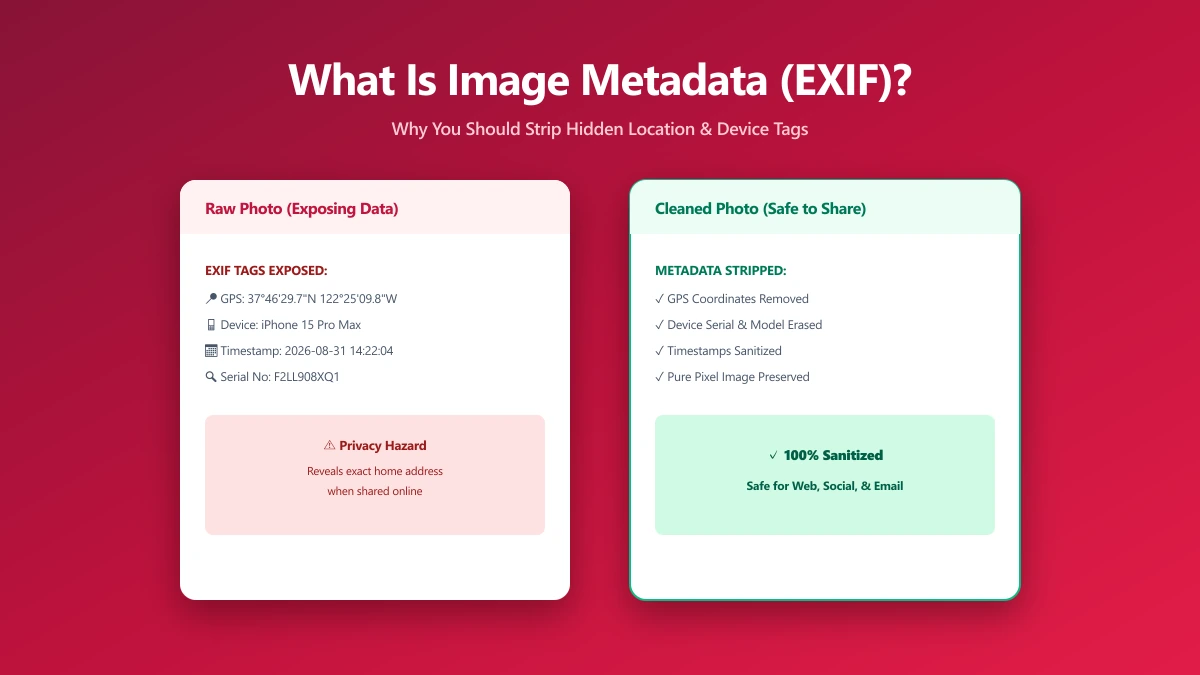
You snap a photo on your phone and share it in a group chat, attach it to an email, or post it to a marketplace listing. To you it's just an image. But embedded invisibly inside that JPEG is a structured block of data recording exactly where you were standing, what device you used, the precise time down to the second, and sometimes your full name.
This hidden layer is called EXIF metadata, and most people share it without ever knowing it exists. For a photo of your lunch, that's a minor curiosity. For a photo taken at your home, a medical facility, a client meeting, or a protest, it's a real privacy exposure that anyone who downloads the file can exploit.
This guide explains exactly what image metadata is, which fields are most sensitive, which platforms strip it and which don't, and how to scrub it clean before you share, without uploading your files to any server. If you need the short answer right now, our metadata removal tool handles it in a single click, entirely client-side.
What Is EXIF Data?
EXIF stands for Exchangeable Image File Format. The standard was defined by the Japan Electronic Industries Development Association (JEIDA) in 1995 and later maintained by JEITA. Today it is implemented universally, every smartphone camera, every DSLR, and every mirrorless system writes EXIF automatically the moment you press the shutter.
EXIF is not a file format itself. It is a container of structured, tagged fields that lives inside JPEG and TIFF files. Each field is identified by a numeric tag ID and holds a value: a string, an integer, a rational number, or a nested block. Most image viewers can read these fields; very few surface them unprompted. That invisibility is exactly the problem.
What About PNG, WebP, and HEIC?
PNG stores metadata differently, in text chunks and iTXt fields, and historically carries less EXIF data than JPEG. WebP and HEIC both support EXIF embedding, and most modern export pipelines preserve it. When you convert between formats using a browser tool, metadata handling depends entirely on the tool: some preserve it, some strip it, and some inadvertently add new fields. Our JPG to WebP converter strips EXIF during conversion, keeping output files private by default.
What Information Does EXIF Store?
The scope of EXIF data surprises most people. The table below covers the fields you will find in a typical smartphone JPEG, and what each one reveals about you:
| EXIF Field | What It Reveals | Example Value |
|---|---|---|
| GPS Latitude / Longitude | Your precise location at capture | 51.5074° N, 0.1278° W |
| GPS Altitude | Elevation above sea level | 23 m |
| DateTimeOriginal | Exact date and time of capture | 2026-04-01 09:23:11 |
| Make | Device manufacturer | Apple |
| Model | Exact device model | iPhone 15 Pro |
| Software | Firmware or editing app version | iOS 17.4.1 |
| LensModel | Specific lens used | Triple camera 6.765 mm |
| FNumber | Aperture at capture | f/1.78 |
| ISOSpeedRatings | Sensor sensitivity | 80 |
| Artist | Creator name field | Mani K. |
| Copyright | Copyright string | © 2026 Mani K. |
| ThumbnailImage | Embedded JPEG preview | (may show uncropped original) |
The ThumbnailImage field is particularly deceptive. If you crop an image to hide a background detail before sharing it, the embedded thumbnail may still contain the original uncropped frame, visible to anyone who reads the raw EXIF.
The Three Metadata Standards You Should Know
EXIF is just one of three overlapping metadata standards that can coexist inside a single image file. A thorough metadata strip must address all three.
EXIF, Camera and Capture Data
Written automatically by the camera or smartphone at capture time. Contains the technical shooting parameters and device identifiers listed in the table above. EXIF is the standard most directly responsible for GPS leakage and device fingerprinting.
IPTC, Publishing and Rights Data
Developed by the International Press Telecommunications Council for photojournalism workflows. IPTC fields include caption, keywords, headline, creator name, organisation, city, country, and copyright notice. These are human-entered, a photographer's workflow might auto-fill their name and studio into every exported file, which then travels with the image indefinitely.
XMP, Editing History
Adobe's Extensible Metadata Platform. Stored as embedded XML inside the image file. XMP records editing history, colour profiles, ratings, labels, and any adjustments made in Lightroom, Photoshop, or compatible apps. It can expose which software you use, when you edited the file, and sometimes a version history of every adjustment, more information than most people would knowingly volunteer.
Platform-by-Platform: Who Strips Your Metadata?
The answer is not what most people assume. Major social networks typically strip EXIF before public display, but messaging apps, email, and direct file hosting do not, and that is where most private sharing actually happens.
| Platform | Strips GPS | Strips Device Info | Strips All EXIF |
|---|---|---|---|
| Instagram (public post) | Yes | Yes | Yes, on public display |
| Facebook (public post) | Yes | Yes | Yes, on public display |
| Twitter / X | Yes | Yes | Yes |
| WhatsApp (image) | No | No | No |
| Telegram (Document mode) | No | No | No |
| Discord upload | No | No | No |
| Email attachment | No | No | No |
| Google Photos (shared link) | Yes (public view) | Partial | Retains original internally |
| Dropbox shared link | No | No | No |
| Self-hosted website / CDN | No | No | No |
Even when platforms strip metadata before public display, they frequently retain a copy of the original file, with all metadata intact, on their own servers. You have no visibility into what they do with it.
Real-World Privacy Incidents Caused by EXIF Data
These are not theoretical risks. EXIF metadata has caused documented, real-world privacy failures across journalism, the military, and everyday commerce.
- ●John McAfee, 2012. A journalist photographed him while he was evading police in Central America. The image's EXIF contained precise GPS coordinates. His location was pinpointed within hours of publication and he was subsequently detained.
- ●US military, 2010. A soldier posted photos of military helicopters online. EXIF coordinates revealed the location of the aircraft, allowing open-source analysts to identify a previously undisclosed forward operating base.
- ●Online marketplace sellers. Hundreds of documented cases exist of sellers photographing items inside their home and uploading those images to listings, inadvertently sharing their home address with every buyer and observer who downloads the file.
- ●Whistleblowers. Individuals leaking internal documents via photographs have been traced through the combination of camera make, model, firmware version, and serial fields embedded in the EXIF, a form of device fingerprinting that is unique even without GPS coordinates present.
How to View the EXIF Data in Your Own Photos
Before stripping metadata, it is worth seeing exactly what is in your files. You can inspect EXIF entirely in your browser using the open-source exifr library, no file ever leaves your device:
// Read EXIF data in-browser, no upload required
import { parse } from 'exifr';

const file = document.querySelector('input[type=file]').files[0];
const exif = await parse(file, { gps: true, all: true });

console.log(exif);
// {
//   Make: 'Apple',
//   Model: 'iPhone 15 Pro',
//   latitude: 51.5074,
//   longitude: -0.1278,
//   DateTimeOriginal: 2026-04-01T09:23:11.000Z,
//   Software: '17.4.1',
//   ...
// }
On Windows, right-click any JPEG → Properties → Details tab. On macOS, open the file in Preview → Tools → Show Inspector → the "i" panel. For a full nested dump including GPS decimal conversions and all nested sub-IFD fields, the open-source ExifTool command-line utility is the most thorough option available.
Five Methods to Remove EXIF Data
- 1.Browser-based removal tool, Fastest for everyday use. No upload, no installation, works on any device. Our metadata removal tool strips EXIF, IPTC, and XMP from JPEG and PNG files entirely in your browser.
- 2.ImageMagick CLI, Scriptable for batch processing:
convert input.jpg -strip output.jpg. Handles entire folders with a shell glob. - 3.ExifTool, The most complete option:
exiftool -all= *.jpg. Can selectively remove only specific tags, for example, strip GPS while keeping your copyright IPTC fields. - 4.macOS Preview, File → Export → uncheck "Include Metadata". Removes most EXIF but does not always clear XMP editing history.
- 5.Windows Photos, Right-click the file → Properties → Details → "Remove Properties and Personal Information". Simple but limited compared to ExifTool for bulk or selective removal.
What Stripping Metadata Actually Does to Your File
Removing metadata does not alter the image itself. Every pixel colour value in every channel is unchanged. What changes is the metadata container that wraps the pixel data. The resulting file looks identical to the human eye but contains none of the structured fields that reveal your location, device, or identity.
File size typically decreases slightly, EXIF blocks are small (a few kilobytes) but measurable. A useful side benefit: stripping metadata before compressing your images means the compressor works on a leaner input, and your final file is fractionally smaller.
If you are a photographer who licenses images, consider keeping IPTC copyright and creator fields while stripping GPS and device data. ExifTool allows selective removal of individual tags, so you can protect your location without losing your attribution chain.
Should You Always Strip Metadata?
Not always. Metadata has legitimate uses. Photographers use IPTC fields to establish copyright chains. Archivists rely on timestamps to catalogue collections. News agencies depend on caption and credit fields to attribute images correctly. The question is not whether metadata is always bad, it is whether this metadata should be attached to this image when shared with this audience.
A photo on your professional portfolio with your copyright IPTC field intact is fine. The same photo sent to a stranger via WhatsApp with your home GPS coordinates embedded is not. Treat metadata like any other personal data: share it intentionally or not at all. Our metadata editor lets you edit individual fields rather than removing everything, when selective control is what you need.
The Bottom Line
Every JPEG you share carries a hidden record of your location, your device, and the exact moment you pressed the shutter. Most people share this data accidentally, with no awareness it exists. The platforms you rely on to strip it (messaging apps, email, direct hosting) typically do not.
The fix is a single step before you share: remove the metadata. It takes two seconds, it does not touch image quality, and it eliminates a class of privacy risk that cannot be undone once a file is in someone else's hands.
Frequently asked questions
Does compressing an image remove EXIF data?
Which messaging platforms do NOT strip EXIF data?
Can I remove metadata from a PNG file?
What is the difference between EXIF and metadata?
Does converting an image to WebP remove EXIF?
Can GPS coordinates in EXIF be faked?
Sources & references
This article was researched and written by Nikola, drawing on the following primary sources and documentation:
Ready to try it?
All tools run entirely in your browser, no uploads, no account required.
Remove Metadata