WebP vs. AVIF: Which Image Format Is Best for SEO in 2026?
Summary
AVIF compresses smaller than WebP but encodes 10× slower. Find out which format wins for LCP, CDN support, and real-world SEO in this 2026 comparison.
Your site's images are almost certainly the largest files your visitors download. Switch to WebP or AVIF and you cut those bytes by 25–50%, which directly improves Largest Contentful Paint (LCP), the Core Web Vitals signal that Google uses as a ranking factor. But which format should you actually use in 2026?
AVIF is technically superior on compression benchmarks. WebP has better tooling, faster encoding, and broader CDN support. Picking the wrong one for your infrastructure means you either miss compression gains or create operational headaches that swallow those gains in engineering time.
This guide gives you a data-driven answer, by image type, hosting setup, and audience device profile. If you just need to convert images right now, our image to WebP converter handles it in-browser with no upload required.
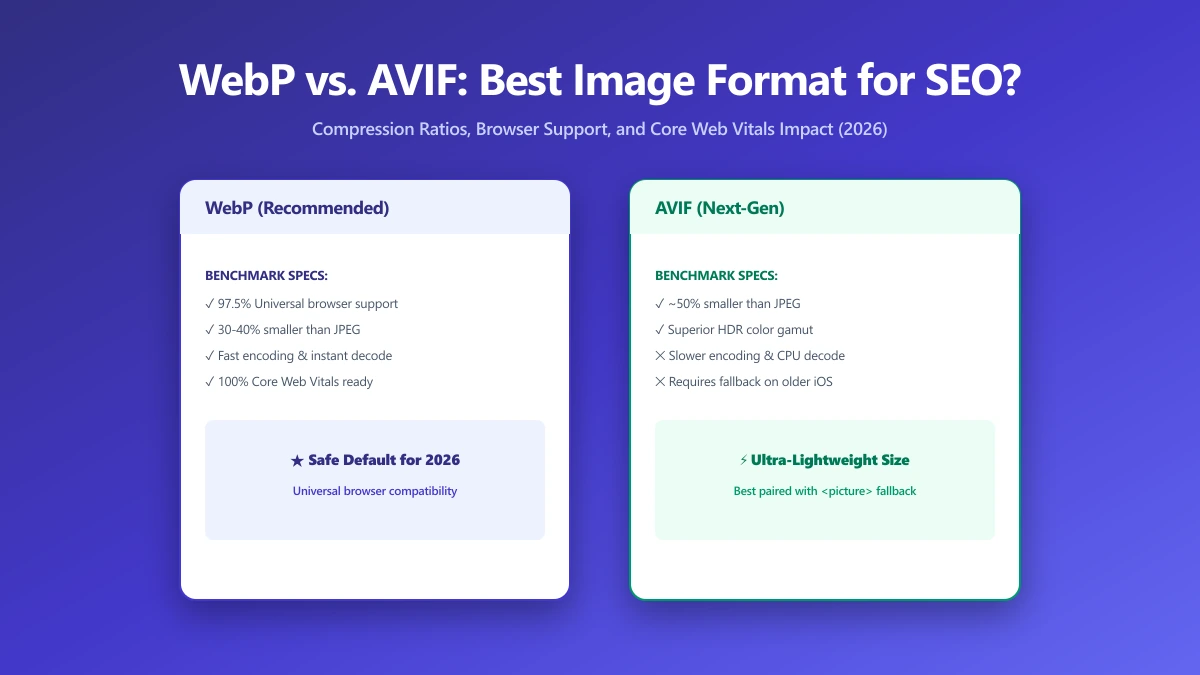
WebP vs AVIF at a Glance
| Factor | WebP | AVIF |
|---|---|---|
| Compression vs JPEG (photos) | 25–35% smaller | 40–55% smaller |
| Browser support (2026) | 97.8% global | 93.2% global |
| Encoding speed (2MP photo) | 50–200 ms | 300–15,000 ms (encoder-dependent) |
| Lossless support | Yes | Yes |
| Transparency (alpha) | Yes | Yes |
| Animation support | Yes (WebP anim) | Yes (AVIF seq) |
| CDN auto-conversion support | Universal | Cloudflare, Cloudinary, Imgix |
| Decode speed on mobile | Fast | Moderate (older devices) |
| Tooling maturity | Excellent | Improving rapidly |
Compression Ratio: AVIF Wins, But Not Always
At equivalent visual quality (measured by SSIM and DSSIM), AVIF achieves 20–40% smaller files than WebP for photographic content. At lower quality settings the gap widens further, AVIF handles compression artefacts more gracefully than WebP, which tends to introduce blockiness and ringing at aggressive quality levels.
The AVIF advantage is not universal, however. It narrows, and sometimes reverses, in these situations:
- ●Images smaller than 200×200px: AVIF container overhead and header size reduces the per-byte advantage on small thumbnails.
- ●Line art, screenshots, and UI images: High-contrast hard edges compress better with WebP lossless or PNG. AVIF's video codec heritage optimises for photographic smooth gradients.
- ●Already heavily compressed source files: If your source JPEG is already at quality 60 or below, recompressing it to AVIF adds encoding artefacts without meaningful file size savings.
- ●Very high quality settings (90+): Both formats converge toward lossless at the top of the quality range; the gap narrows significantly above quality 85.
Browser Support in 2026
Both formats are now close to universal, but the remaining unsupported cohorts differ in ways that matter for different audiences.
| Browser | WebP | AVIF | Notes |
|---|---|---|---|
| Chrome 90+ | Yes | Yes | Full support for both |
| Firefox 65+ | Yes | Yes | AVIF since Firefox 93 |
| Safari 14+ | Yes | Yes | AVIF since Safari 16 |
| Edge 18+ | Yes | Yes | Chromium-based Edge 121+ |
| iOS Safari 14+ | Yes | Yes (16+) | iOS 15 and below: no AVIF |
| Samsung Internet 12+ | Yes | Yes | AVIF since Samsung Internet 21 |
| Opera | Yes | Yes | Full support |
The 6.8% without AVIF support is not evenly distributed. If your analytics show a significant share of iOS 15 users (common in developing markets and corporate device fleets with delayed OS updates), the unsupported cohort is higher. Check your real audience data before assuming universal coverage.
Serve AVIF with a WebP fallback via the HTML <picture> element. You get maximum compression where supported, with zero broken-image risk on older browsers, at the cost of two files instead of one.
<picture>
  <source srcset="hero.avif" type="image/avif">
  <source srcset="hero.webp" type="image/webp">
  <img src="hero.jpg" alt="Hero" width="1200" height="630"
       fetchpriority="high" decoding="async">
</picture>
Encoding Speed: WebP Wins Significantly
This is the most underrated difference between the two formats, and the one that most affects whether you can practically adopt AVIF at scale.
| Encoder | Format | Speed | File Size (relative) |
|---|---|---|---|
| libwebp | WebP | 50–200 ms | Baseline |
| libaom (speed 6) | AVIF | 2,000–4,000 ms | ~30% smaller |
| libaom (speed 10) | AVIF | 800–1,500 ms | ~20% smaller |
| SVT-AV1 (preset 8) | AVIF | 300–600 ms | ~25% smaller |
| rav1e | AVIF | 1,000–3,000 ms | ~28% smaller |
For build-time optimisation (static sites, CI pipelines that run once per deploy), AVIF is absolutely viable, encode once, serve forever, cache aggressively. For runtime processing (user uploads, dynamic on-the-fly resizing, image CDN without native AVIF support), the encoding latency makes WebP far more practical.
CDN and Hosting Support
Many modern image CDNs can auto-convert and serve AVIF or WebP based on the browser's Accept header, so you only store one master file and the CDN handles format negotiation automatically.
- ●Cloudflare Images / Polish: Serves WebP automatically; AVIF requires Images tier
- ●Cloudinary: Full AVIF and WebP support via f_auto parameter
- ●Imgix: Auto format negotiation for both; fm=avif or fm=webp for explicit control
- ●Vercel: Next.js Image Optimization serves WebP and AVIF automatically based on Accept header
- ●AWS CloudFront + Lambda@Edge: Manual, requires custom origin logic or a third-party image service
- ●Bunny.net CDN: WebP auto-conversion available; AVIF in beta
If you're on Vercel deploying a Next.js site, you already get automatic format negotiation for free, the next/image component handles AVIF/WebP selection transparently. No extra configuration needed.
Decode Speed and LCP on Mobile Devices
A smaller file does not guarantee faster LCP if decoding is slower. AVIF's AV1-based codec is computationally more complex than WebP's VP8/VP10 codec. On flagship smartphones this difference is negligible, hardware AV1 decoders are now standard. On budget Android devices (common in Southeast Asia, Africa, and Latin America) without hardware AV1 decode, AVIF decode can be 2–4× slower than WebP for the same visual content.
The practical implication: AVIF's smaller file size saves transfer time, but decode time increases. On fast connections with slow devices, AVIF may not actually improve LCP. On slow connections with modern devices, AVIF almost always wins. Know your audience's connection speed and device profile before choosing.
When to Use Each Format
| Use Case | Recommended Format | Reason |
|---|---|---|
| Hero / LCP image (modern audience) | AVIF + WebP fallback | Maximum byte savings where it matters most |
| Hero / LCP image (broad/legacy audience) | WebP | Safer compatibility; still 25–35% smaller than JPEG |
| Product photos | AVIF + WebP fallback | High visual fidelity at smaller size |
| Thumbnails < 200px | WebP | AVIF overhead less efficient at small sizes |
| Screenshots and UI images | WebP lossless or PNG | Hard edges compress better outside AVIF |
| Images with transparency | WebP or AVIF | Both support alpha; WebP is safer |
| Animated images | WebP anim or AVIF seq | Both better than GIF; WebP has better tooling |
| User uploads (runtime) | WebP | Encoding speed rules out on-the-fly AVIF |
| Build-time static assets | AVIF + WebP fallback | Encode once, cache long, maximum savings |
What About JPEG XL?
JPEG XL (JXL) is a newer format from the JPEG committee that offers comparable or better compression than AVIF, lossless-to-lossy roundtripping, and faster decode. Chrome added JXL support in 2024; Safari and Firefox are following. As of mid-2026, browser support sits around 78%, not yet at the level needed for production use without a JPEG fallback chain.
For most teams in 2026, the practical path is: adopt AVIF with WebP fallback now, watch JXL support as it grows, and plan a migration once it clears 95% global coverage. JXL is not a reason to delay shipping WebP or AVIF today.
The Bottom Line
For most websites in 2026, the right answer is: serve both using the <picture> element with AVIF as primary and WebP as the fallback. You get maximum compression gains where browsers support it, and reliable display everywhere else.
If you can only support one format: use WebP. The 97.8% browser coverage is effectively universal, the tooling is mature, the CDN support is universal, and the compression savings over JPEG are significant enough to meaningfully improve LCP for most sites.
Start with your LCP image, that is the one that moves your Core Web Vitals score. Convert it to WebP today, then add AVIF as a progressive enhancement once your build pipeline supports it.
Frequently asked questions
Is AVIF always better than WebP for SEO?
Can I use AVIF without a fallback?
Does Next.js automatically serve AVIF?
Which format is better for transparency?
How much smaller are WebP files than JPEG?
Does converting to WebP or AVIF reduce image quality?
Sources & references
This article was researched and written by Nikola, drawing on the following primary sources and documentation:
Ready to try it?
All tools run entirely in your browser, no uploads, no account required.
Convert Image to WebP