
How to Add Page Numbers to a PDF (Free, No Upload)
Summary
Add page numbers to a finished PDF without going back to Word. Three formats, how to skip the cover page, and where to put them so printing keeps them.
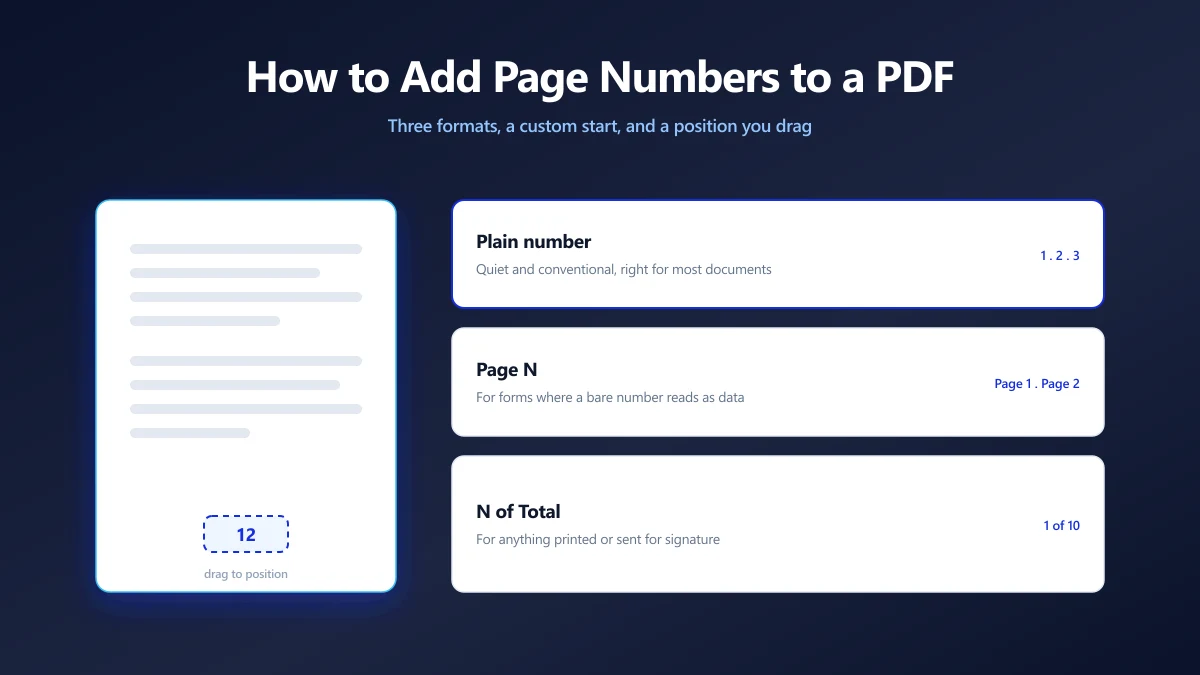
The thesis is submitted as a PDF and the department wants numbered pages. The court filing needs sequential numbers. The proposal came back from a colleague with a note: nobody can reference anything in this.
The document is already a PDF, so the original Word file is either long gone or now out of date. Rebuilding it to add a footer is the wrong shape of solution.
You can draw the numbers straight onto the finished document instead. Here is how adding page numbers to a PDF works, and the two settings people mix up every time.
Three Formats, and When Each One Fits
The format is the first decision, and it is worth thinking about for ten seconds because different readers need different amounts of information.
| Format | Looks like | Use it when |
|---|---|---|
| Plain number | 1, 2, 3 | Most documents. Quiet, conventional, never in the way. |
| Page N | Page 1, Page 2 | Forms and filings where a bare number could be mistaken for data. |
| N of Total | 1 of 10, 2 of 10 | Anything printed, posted or faxed, where a reader needs to know pages are missing. |
N of Total is the one to choose for contracts sent for signature. A signer who receives 11 of 12 pages can see that a page is missing without having to count anything.
How to Add the Numbers
Positioning is done by dragging on a live preview of your own first page, so you can see the number sitting where it will actually print.
- 1.Open the page numbering tool and drop your PDF in. The first page renders locally as a preview.
- 2.Drag the number to where you want it. It snaps to the horizontal centre as you pass through, so a centred footer is easy to hit exactly.
- 3.Pick the format, then set the starting number and, if you need it, the range of pages to number.
- 4.Adjust size and colour if the default is too loud for the document, then apply and save.
Skipping the Cover Page: Two Settings, Not One
This is where most people get a result they did not expect, because two different settings sound like they do the same thing.
- ●Pages to number decides which pages get a number drawn on them. Leave page 1 out and the cover stays clean.
- ●Start at decides what the first drawn number says. Set it to 1 and numbering restarts on the first numbered page.
A 20 page report with a cover and a contents page

  pages to number : 3-20
  start at        : 1

  result: cover and contents are clean,
          the first page of the body reads 1,
          the last page reads 18
Want the body to read 3 to 20 instead, matching the physical page count? Leave the range at 3-20 and set start at to 3. The two settings are independent on purpose.
The Numbers Are Drawn On Top, Not Inserted
Nothing reflows. This is the difference between a PDF and a word processor, and here it works in your favour.
In Word, adding a footer changes the text area and can push content onto another page. In a PDF, every glyph already has fixed coordinates. A page number is new content painted over the top, so your existing text, images and layout are untouched and the page count cannot change.
Because numbers are painted on top rather than inserted into a footer, they can land over existing content. If your document already has a footer, drag the number clear of it and check a page from the middle of the document, not just the first one.
Picking a Position That Survives Printing
A number that looks perfect on screen can vanish on paper. Three things eat page numbers:
- ●Printer margins. Most desktop printers cannot print to the edge of the sheet. Keep numbers at least 12 to 15 mm in from any edge.
- ●The binding edge. Anything stapled, comb bound or perfect bound loses the inner margin. Bottom centre is the safest position for a bound document.
- ●Hole punches. A number in the top left of a punched document meets the hole. Bottom right or bottom centre avoids it.
Bottom centre is the default for a reason: it survives binding, punching and most margin trimming. Choose the top right only when a house style asks for it.
Academic and Legal Conventions
If someone is going to reject your document over its numbering, it is usually because of a convention rather than a mistake.
APA style puts the page number in the top right of every page, including the title page, which is the opposite of the usual instinct to keep covers clean. Check the style guide you have been given before you skip page 1, because the APA page header rules are specific about it.
Legal filings often ask for sequential numbering across an entire bundle. Sequential numbering with a custom start handles a bundle assembled from several documents: number the first file 1 to 40, then start the second at 41. Full Bates numbering with a case prefix and zero padding is a different job, and this tool does not do it.
Numbering a bundle in parts only works if the parts stay in order. Do any reordering and merging first, then number last. Numbers are drawn onto pages, so they do not renumber themselves when pages move.
Numbering a Protected Document
An encrypted PDF cannot be modified until it is decrypted, so a numbering tool has to ask for the open password first. Entering it decrypts the document in your browser's memory, and the password never travels anywhere.
If you would rather not type it every time you touch the file, remove the password once and work on the unlocked copy.
Why Do This in the Browser
Numbered documents are, almost by definition, documents going somewhere official: a court, a university, a client, a regulator. They are also frequently confidential.
A browser based tool renders the preview and writes the numbers with JavaScript on your own machine. Nothing is uploaded, so there is no server side copy of your filing or your thesis sitting in a queue somewhere waiting to be deleted.
Number It Last, and Number It Once
Page numbers are painted onto fixed coordinates, so they never reflow your document and never change its page count. They also never update themselves. Do your reordering, merging and deleting first, then number the finished article.
Decide on a format, keep the number clear of margins and binding, and check a middle page before you save. Open the numbering tool and drop your PDF in to see the preview.
Frequently asked questions
How do I add page numbers to a PDF without Word?
Can I start numbering from a page other than the first?
Will adding page numbers change my existing text or layout?
What page number format should I use?
Where should page numbers go so they do not get cut off?
Can I add page numbers to a password protected PDF?
Do page numbers update if I reorder the pages later?
Sources & references
This article was researched and written by Nikola, drawing on the following primary sources and documentation:
Ready to try it?
All tools run entirely in your browser, no uploads, no account required.
Add Page Numbers

