
Passport Photo Size Requirements, and How to Prepare One Yourself
Summary
The sizes differ by country and the rejection reasons rarely do. The measurements that matter, the head height rule people miss, and how to crop to it.
Passport photos get rejected at a rate that surprises people, and almost never for the reason they were worrying about.
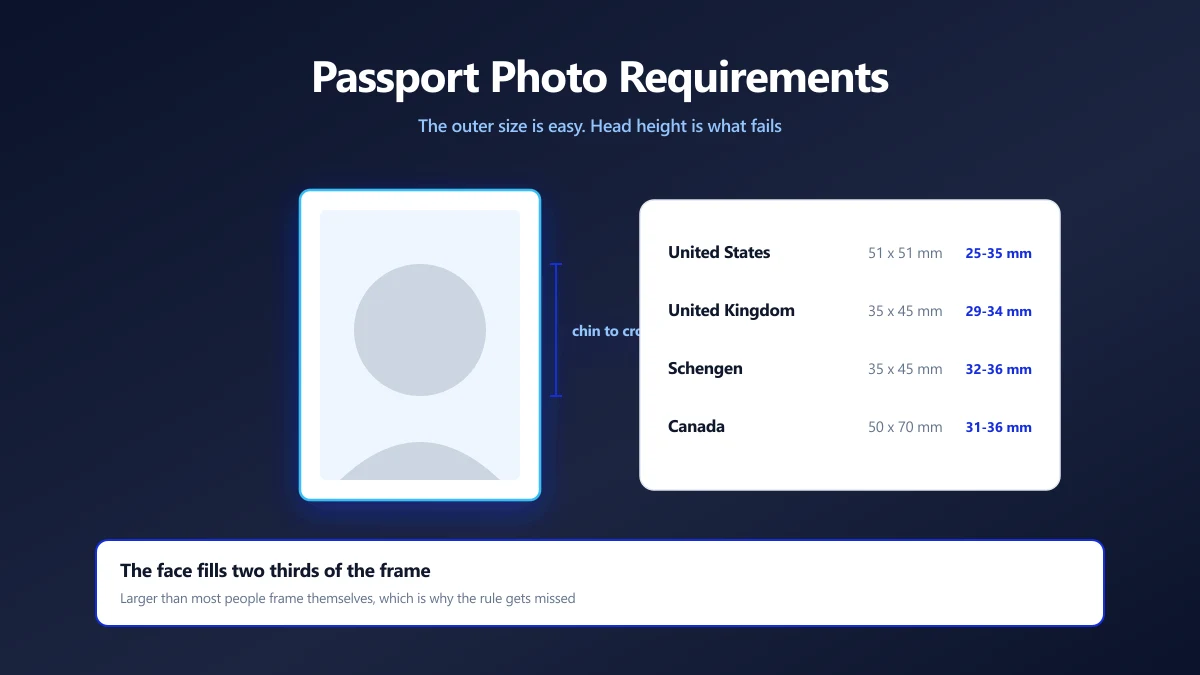
The paper size is the easy part. What catches people out is head height: the proportion of the frame your face must occupy, measured from chin to crown, which is specified in millimetres and checked with a template.
Here are the measurements that actually matter, and how to prepare a compliant photo from one you already have.
The Sizes, by Country
Photo dimensions vary, and head height varies with them. These are the published requirements for the most commonly asked about passports.
| Country | Photo size | Head height (chin to crown) |
|---|---|---|
| United States | 2 x 2 inches (51 x 51 mm) | 25 to 35 mm, head centred |
| United Kingdom | 35 x 45 mm | 29 to 34 mm |
| Schengen area | 35 x 45 mm | Around 32 to 36 mm |
| India | 35 x 45 mm (51 x 51 mm for some forms) | Face covering most of the frame |
| Canada | 50 x 70 mm | 31 to 36 mm |
| Australia | 35 x 45 mm | 32 to 36 mm |
Check the issuing authority's own page before you print. These requirements are revised, and a photo booth or shop working from an out of date template is a common source of rejection.
Head Height Is the Rule People Miss
Almost everyone gets the outer dimensions right, because that is the number on the form. Head height is the one that fails.
Take a UK photo as an example: 35 x 45 mm overall, with the head between 29 and 34 mm from chin to crown. That means your face must fill between 64% and 76% of the height of the picture. That is much larger than most people frame themselves, and much larger than a casual photo cropped square.
Crown means the top of your head, not the top of your hair if it is voluminous. Chin means the bottom of the chin, not the bottom of the jaw.
Preparing One From a Photo You Have
- 1.Start with a suitable original. Plain light background, even lighting, neutral expression, eyes open, no glasses, no shadows behind you.
- 2.Work out the crop ratio. For 35 x 45 mm that is 7:9. For a US 2 x 2 inch photo it is square.
- 3.Crop to that ratio with the crop tool, positioning so the head occupies the right proportion of the height and sits centred with a small gap above.
- 4.Resize to print resolution. At 300 DPI, 35 x 45 mm is about 413 x 531 pixels. Use the resize tool.
- 5.Compress only if a portal demands it, using the compressor. For printing, leave the quality high.
Measure head height as a fraction rather than in millimetres. For a UK photo, the chin to crown distance should be roughly two thirds to three quarters of the image height. That is much easier to judge on screen than converting to millimetres.
The Rejection Reasons That Are Not About Size
- ●Shadows. Behind the head on the background, or cast across the face. Diffuse daylight facing a window avoids both.
- ●Glasses. Increasingly disallowed outright. Where permitted, no glare and eyes fully visible.
- ●Expression. Neutral, mouth closed. Smiling is a rejection in most systems now, because it distorts facial measurements.
- ●Background. Plain and light, no texture or pattern. Cream and pale grey are usually accepted; white is safest.
- ●Digital editing. Do not retouch, smooth skin or alter the face. Biometric checks compare the photo to you, and filters cause failures.
- ●Age of the photo. Usually must be within the last six months.
Printing It
If you need physical prints, place the photo on a 6 x 4 inch sheet at the correct physical size and have that printed at a photo shop. Printing a single small image on a home printer usually gives the wrong physical dimensions and the wrong paper.
The critical detail is DPI. An image resized to 413 x 531 pixels prints at 35 x 45 mm only at 300 DPI. If the print shop scales it to fit a frame, the measurements change and the head height rule breaks with them.
Keeping the Photo to Yourself
A passport photo is a biometric image of your face, prepared alongside an application containing everything else about you. It is worth not distributing casually.
Cropping and resizing in the browser keeps the image on your own machine. Nothing is uploaded, so there is no copy of your face on a service you cannot identify, which matters more for this file than for most.
Get the Head Height Right
The outer measurements are easy and rarely the problem. Head height, background and expression are where applications fail, and none of them can be fixed after the fact by resizing.
Check your issuing authority's current template, crop to the ratio with the head filling the right proportion, then resize to 300 DPI. Start with the crop tool.
Frequently asked questions
What size is a passport photo?
What is the head height rule?
What resolution should a passport photo be?
Can I smile in a passport photo?
Can I edit or retouch the photo?
Can I take a passport photo at home?
Sources & references
This article was researched and written by Nikola, drawing on the following primary sources and documentation:


