Why Editing Text in a PDF Is Hard, and How Editors Do It Anyway
Summary
A PDF has no paragraphs, only glyphs at coordinates. What an editor has to reconstruct, why fonts break edits, and which changes are safe to make.
Changing one wrong digit in a PDF feels like it should take a second. Instead you get a tool that turns the line into an image, loses the font, or reflows the paragraph into something that no longer matches the page.
This is not incompetence on the tool's part. The format genuinely does not store what an editor needs.
Here is what is really inside a PDF, what an editor has to reconstruct before you can type a single character, and which kinds of text edits in a PDF are safe to make.
A PDF Does Not Contain Paragraphs
This is the root of every difficulty that follows. A PDF is a description of how to paint a page, not a description of what the page says.
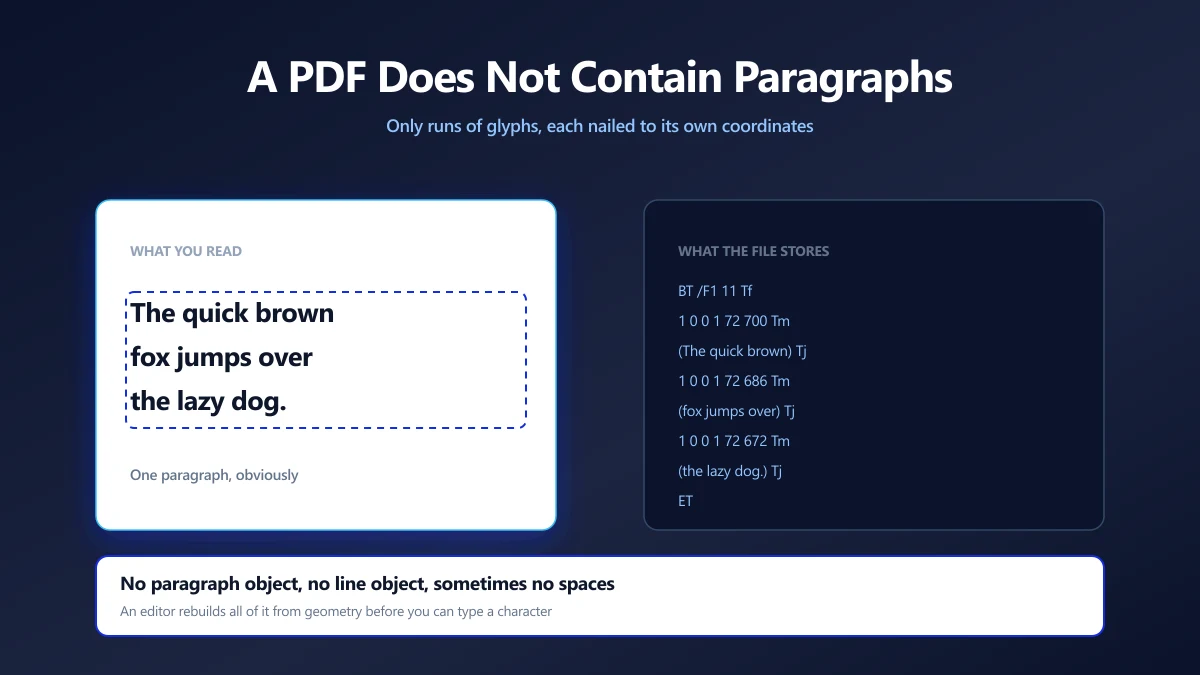
Text arrives as runs: set a font, set a size, set a position matrix, show these glyphs. There is no paragraph object, no line object, and often no word object either. Even the spaces may be missing, replaced by a jump in the horizontal position.
what you read        what the file stores

The quick brown     BT /F1 11 Tf
fox jumps over         1 0 0 1 72 700 Tm
the lazy dog.          (The quick brown) Tj
                       1 0 0 1 72 686 Tm
                       (fox jumps over) Tj
                       1 0 0 1 72 672 Tm
                       (the lazy dog.) Tj
                    ET
Three separate instructions, each with its own coordinates. Nothing in the file says they belong together. That relationship exists only in your head as you read the page.
Problem One: Finding the Paragraph
Before an editor can let you click a paragraph, it has to decide what a paragraph is. There is no marker to read, so it infers one from geometry.
Runs that share a baseline become a line. Lines stacked at a consistent spacing, with matching left edges and the same font, become a block. Get the thresholds slightly wrong and two columns merge into one nonsense paragraph, or a single paragraph splits at every line.
This is also why text copied out of a PDF so often pastes with line breaks in odd places. The copying tool is making the same guesses, and a guess that is good enough for reading is not always good enough for editing.
Problem Two: The Font May Not Contain Your Letter
This is the failure people find most surprising, and it is the reason so many editors quietly swap your font for something generic.
PDFs usually embed subset fonts. If a document only ever used 60 characters, the producer embeds those 60 glyph outlines and throws the rest away, which is excellent for file size and awkward for editing.
document text : "Invoice 2026"
subset holds  : I n v o i c e 2 0 6 and a space

you type      : "Zone 4"
available     : no Z, no 4

honest result : substitute a font, and say so
bad result    : draw whatever glyph sits at that
                code, which is how a Z becomes a w
The failure is genuinely silent. A subset font often has its internal character map rewritten, so asking for a character can return some other glyph rather than nothing at all. The edit looks fine in the editor and is wrong in the saved file.
The honest behaviour is to check whether the embedded font can draw every character you typed, and where it cannot, substitute a standard font and tell you which character forced it. A tool that never mentions fonts is not necessarily doing better, it may simply not be checking.
Problem Three: Nothing Reflows
In a word processor, text sits in a flow and the layout engine positions it for you. In a PDF the positions are the document, and there is no engine left to re-run.
Make a sentence three words longer and nothing moves aside. The new text runs into the margin, over the next column, or off the page, because every other glyph on that page is nailed to its own coordinates.
An editor that handles this properly has to re-lay-out the paragraph itself: measure the replacement text in the chosen font at the chosen size, break it into lines at the original wrap width, and redraw the whole block.
Re-laying out a paragraph replaces the original text rather than patching it. If the paragraph carried several fonts, sizes or colours within itself, expect a re-laid-out version to be more uniform than the original.
Which Edits Are Safe
Knowing where the difficulty comes from makes it easy to predict which changes will go smoothly.
| Edit | How it goes | Why |
|---|---|---|
| Fixing a typo, same length | Reliable | The line keeps its geometry and the characters are already in the font. |
| Changing a date or a figure | Reliable | Digits are almost always present in the subset. |
| Rewriting a sentence | Usually fine | Needs a clean re-layout of that paragraph. |
| Adding a new name or code | Watch the font | Capitals and symbols the document never used may be missing. |
| Editing a scanned page | Not directly | There is no text to edit, only an image of text. |
| Restructuring a whole page | Wrong tool | Convert to a format built for flowing text. |
How to Edit Text in a PDF
- 1.Open the PDF editor and drop your file in. Editable blocks are detected on the page you are viewing.
- 2.Click the paragraph you want to change. It becomes editable in place, at its original position and size.
- 3.Type. Keep an eye on any warning about a font that cannot draw a character you have used.
- 4.Apply the changes, then save the new PDF and check the edited page in a normal viewer.
That last check matters more than it sounds. The editor is showing you a rendering, and a viewer is the thing your reader will use.
Scanned Pages Need OCR First
A scanned page holds one image per page and no text at all. Find in page returns nothing because there is nothing to find.
Running OCR over the document adds a recognised text layer that makes it searchable. That layer is for search and selection rather than for rewriting the page, so treat OCR as the route to finding things, not to editing them.
When to Convert Instead
If you are rewriting whole sections rather than correcting details, you want a format that has a layout engine in it.
Converting to Word gives you real paragraphs, real styles and real reflow, at the cost of some fidelity in the conversion. Our guide to converting without losing formatting covers what survives that trip and what does not.
The rule of thumb: editing in the PDF for changes measured in words, converting for changes measured in paragraphs.
Why the Browser Suits This Job
Editing needs two things that browsers happen to be very good at: rendering pages and laying out text. The same engine that positions text on a web page can measure a replacement paragraph and work out where its lines should break.
It also keeps the document where it belongs. The PDFs people edit are invoices, contracts and forms with real names and numbers in them, and none of that needs to leave your machine to have a date corrected.
Edit Words in the PDF, Paragraphs Somewhere Else
A PDF stores positioned glyphs, not text. An editor reconstructs paragraphs from geometry, checks whether an embedded subset font can draw what you typed, and re-lays-out the block when the length changes. Each of those steps can fail quietly, which is why PDF editing has the reputation it has.
Keep your edits small, watch for font warnings, and always reopen the saved file to check. Open the editor and drop a PDF in to see which blocks it finds.
Frequently asked questions
Why is editing text in a PDF so difficult?
Why does the font change when I edit text in a PDF?
Can I edit a scanned PDF?
Why does my text run off the page after editing?
Is it better to edit a PDF or convert it to Word?
Will editing a PDF change its other pages?
Does editing a PDF invalidate its digital signature?
Sources & references
This article was researched and written by Nikola, drawing on the following primary sources and documentation: