How to Remove a Password From a PDF You Own
Summary
A PDF can carry two different passwords, and only one of them is the reason you keep typing. Which is which, how to remove it, and what no tool can do.
Your bank sends statements encrypted. Payroll sends payslips encrypted. Your own accountant sends back a tax pack with a password you now type several times a week.
The encryption did its job in transit. It is now just friction on a file sitting in your own archive, where it is already behind your device password and your disk encryption.
Here is how to remove a password from a PDF you have the password for, why the two kinds of PDF password behave so differently, and what no honest tool will offer to do.
A PDF Can Carry Two Different Passwords
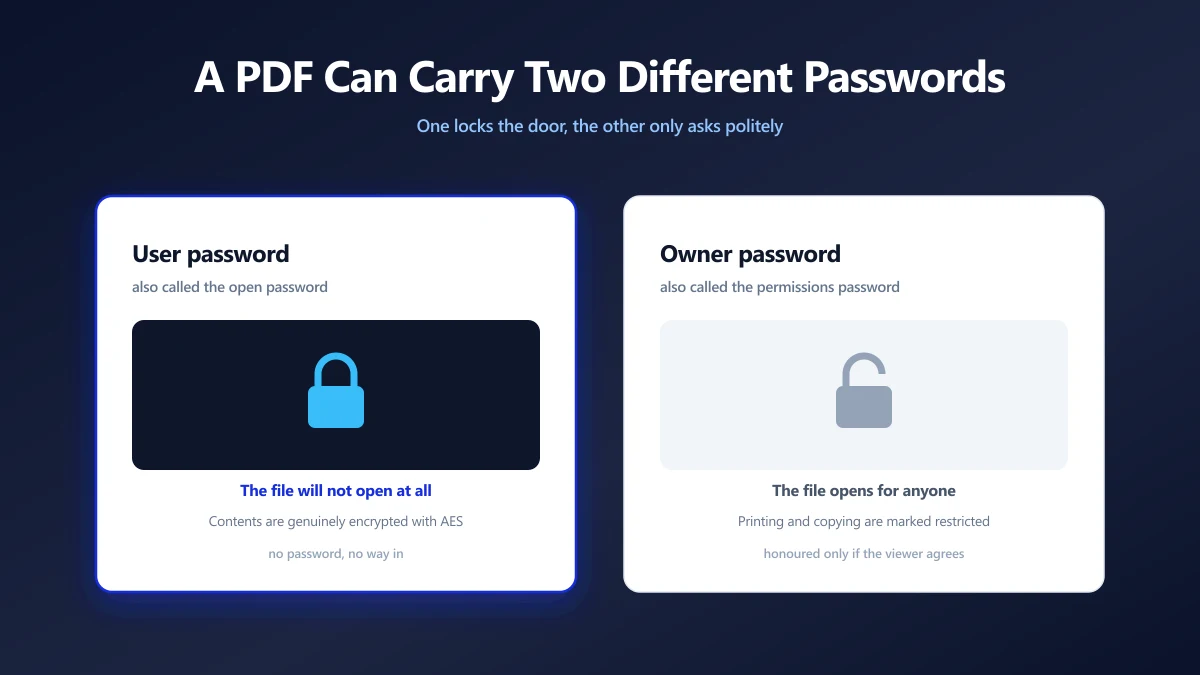
Almost every confused search about PDF passwords comes down to this distinction, and most tools never explain it.
| Password | Also called | What it does |
|---|---|---|
| User password | Open password | The file will not open without it. The content is genuinely encrypted. |
| Owner password | Permissions password | The file opens freely, but printing, copying or editing are marked as restricted. |
A user password is real protection: without it, the page contents cannot be decrypted by anyone, including us. An owner password is closer to a request. The document is readable by anyone who opens it, and the restrictions rely on the viewer choosing to honour a flag in the file.
If the document opens without a prompt but you cannot select text or print it, you are looking at an owner password. If a dialog blocks you at the door, that is a user password.
How to Remove the Password
The operation is simple, and the important part is that both the file and the password stay on your machine.
- 1.Open the unlock PDF tool and drop the protected file in.
- 2.Type the password you already use to open it.
- 3.The document is decrypted in your browser's memory.
- 4.Save the unlocked copy. It is a standard PDF with no encryption left in it, and it opens in any viewer without a prompt.
The original file on your disk is untouched. You end up with two copies: the encrypted one you were sent, and a clean one you can actually work with.
What No Tool Can Do For You
This part is worth being blunt about, because the search results around this topic are full of promises that cannot be kept.
If you do not know the password, an unlocking tool cannot help. Decryption needs the key, and the key comes from the password. There is nothing to guess at cleverly: a modern PDF is encrypted with AES, and the whole point of AES is that you cannot read the contents without the key.
Anything advertising itself as a way to open a PDF you have no password for is either running a brute force attempt that will fail on any reasonable password, or it is not doing what it says. Either way, it wants your confidential document uploaded to find out.
Removing protection from a document that is not yours, or that you were not given the password for, is not something a tool can make legitimate. This is for files you own or were sent along with the password to open them.
What Changes in the File
Decryption rewrites how the document is stored, not what it contains.
- ●The content is identical. Text stays text, images keep their encoding, fonts stay embedded. Nothing is re-rendered, so there is no quality cost.
- ●The encryption dictionary is gone. No viewer will prompt for a password again, because there is nothing left to prompt about.
- ●Permission flags go with it. Printing and copying restrictions are part of the same security handler, so they are removed along with the encryption.
- ●The file size moves slightly. Usually down a little, since encrypted streams compress differently. The difference is rarely noticeable.
A digital signature on the document will be invalidated, because any change to the bytes breaks the signature. If the PDF is signed and the signature matters legally, keep the signed original and unlock a copy.
When You Should Keep the Password
Unlocking is the right move for a file living in your own archive. It is the wrong move for a file about to travel.
If the document is going out by email, into shared storage, or onto a USB stick, the encryption is doing exactly the job it was added for. Email in particular passes through more infrastructure than most people picture.
The sensible pattern is to unlock for working, and re-protect before sending, ideally with a password you chose rather than the one your bank generates from your date of birth.
Choosing a Password Worth Having
If you are setting a new one, length beats complexity. Current NIST digital identity guidance favours long passphrases over short strings of substituted symbols, and advises against forced complexity rules that push people towards predictable patterns.
A four word passphrase you can say down the phone protects a document better than P@ssw0rd1 and is far easier to pass to the person who needs it.
Why the Browser Matters More Here Than Anywhere Else
For most PDF operations the privacy argument is about the file. For unlocking, it is about the file and the password together.
A server based unlocker asks you to upload an encrypted document and then send the key to it in the same session. Whatever their retention policy says, you have handed one service both halves of the problem, and passwords are reused far more often than anyone admits.
A browser based tool runs the decryption in JavaScript on your own machine. The password is used in memory and discarded, the document never moves, and there is no server side copy to breach. If you want the general version of this argument, see are online PDF converters safe.
Unlock the Archive Copy, Protect the One That Travels
Work out which password you are dealing with first. An open password means the content is genuinely encrypted and you need the key. A permissions password means the document was readable all along.
Then unlock the copy you keep, leave the original as it arrived, and re-protect anything you send back out. Open the unlock tool and drop your file in to get started.
Frequently asked questions
How do I remove a password from a PDF?
Can I unlock a PDF without the password?
What is the difference between a user password and an owner password?
Does removing a PDF password change the document?
Will the unlocked PDF open on every device?
Is it safe to unlock a confidential PDF online?
Should I remove the password before emailing a document?
Sources & references
This article was researched and written by Nikola, drawing on the following primary sources and documentation: