Is Sejda Safe? What Its Privacy Policy Actually Says
Summary
Sejda publishes clear retention terms, which puts it ahead of most. Here is what it states, what server processing means regardless, and how to check.
Sejda is one of the better known PDF tool sites, and the question people ask before uploading a contract to it is a fair one: where does the file go, and for how long?
Unlike a lot of free tools, Sejda answers it in writing. That is worth more than a reassuring badge on a landing page, and it is the thing to look for in any tool of this kind.
Here is what its policy states, what that does and does not protect you from, and how to check any similar service for yourself.
What Sejda Publishes
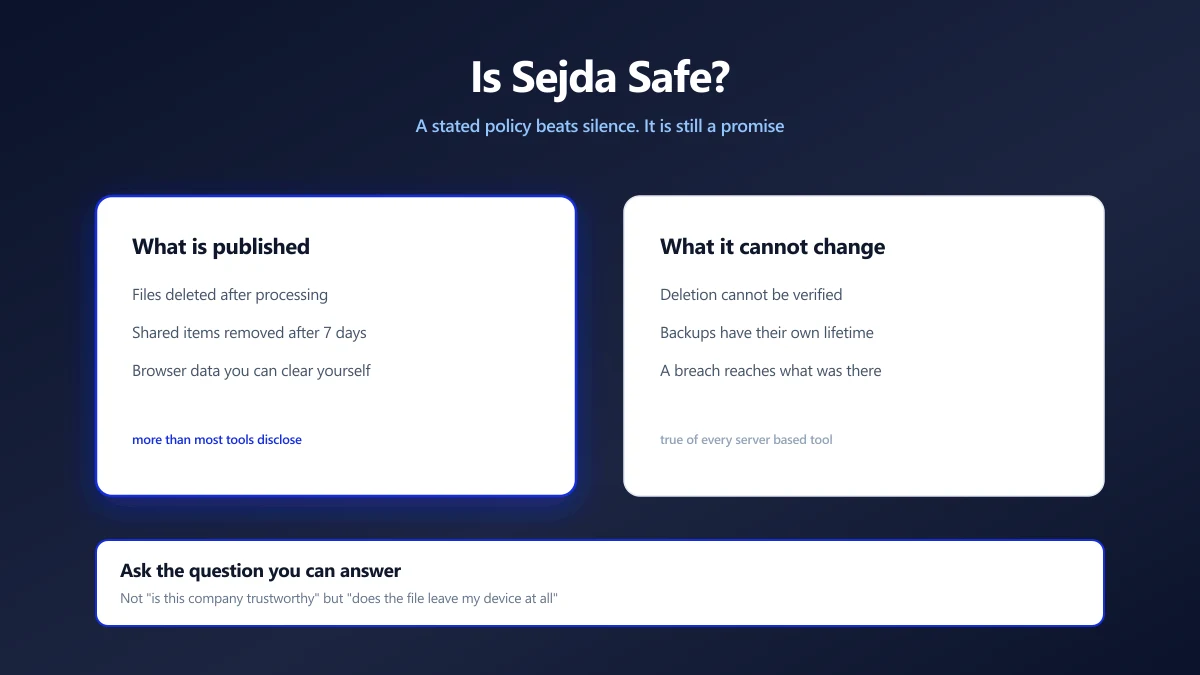
Sejda's privacy policy states that uploaded files are deleted after upload or processing, and that items you deliberately share are removed seven days after being shared. It also describes browser stored data that you can clear yourself, with a delete control, by logging out, or by clearing the site's storage.
Read that carefully, because the shape of it matters more than the numbers. It is a stated, specific, time bound commitment. Many free tools say nothing at all, and silence is not the same as a short retention period.
Policies change. This describes what the policy said when this was written, and the link above is the version that governs you today. Treat any article about a company's retention terms, including this one, as a pointer to the source rather than a substitute for it.
What a Stated Policy Does Not Change
A good policy reduces risk. It does not remove the structural fact underneath it.
Sejda processes files on its servers. That means your document is transmitted over the network, written to storage that belongs to someone else, and read by software you cannot inspect, before being deleted according to a schedule you are trusting rather than verifying.
- ●Deletion is a promise, not a proof. There is no way for you to confirm a file was removed, from the outside.
- ●Backups have their own lifetime. A file deleted from live storage may persist in a backup for longer, which is normal engineering rather than bad faith.
- ●A breach is retrospective. A compromise reaches whatever was on the system at the time, whatever the policy says about later.
- ●Legal process can compel retention. Policies generally carve out legal obligations, as they must.
None of that is an accusation. It is true of every server based service, and it is the reason the architecture matters as much as the terms.
The Question That Settles It
Rather than asking whether a company is trustworthy, which you cannot verify, ask a question you can answer: does the file leave my device at all?
If it does, you are relying on policy, infrastructure and good faith. If it does not, there is nothing to retain, nothing to breach and no policy to read. That is a difference in kind rather than in degree.
How to Check Any Tool Yourself
- 1.Open the tool's page and press F12 to open developer tools.
- 2.Go to the Network tab and clear it.
- 3.Add your file and run the operation.
- 4.Watch for a request carrying your file. A large upload request means server side processing. If the only traffic is the page's own scripts, the work is happening locally.
Test with a file you do not mind uploading. The point of the test is to find out what happens, and finding out by uploading a real contract defeats the purpose.
When Server Processing Is Fine
This is not an argument that every upload is reckless. Plenty of documents are not sensitive, and a tool with clear terms doing a job well is a reasonable choice for them.
The distinction worth drawing is by document rather than by tool. A public brochure, a form you downloaded from a government website, a draft with no real data in it: upload those anywhere that does the job.
Contracts, medical records, financial statements, identity documents, anything under NDA, and anything containing someone else's personal data are a different category. For those, the architecture question is the one that matters, and we set out the full argument in are online PDF converters safe.
Doing the Same Jobs Without the Question
Most of what people use these sites for, compressing, merging, splitting, rotating and converting, can run entirely in a browser now. No upload, no account, no retention policy to read, because there is nothing held anywhere to retain.
You can verify that with the same Network tab test, which is the point: it is checkable rather than promised.
Read the Policy, Then Ask Where the File Goes
Sejda publishing specific retention terms puts it ahead of the many tools that publish nothing. That is worth crediting, and it is the first thing to look for anywhere.
Then ask the structural question underneath it. For a document that matters, a tool that never receives the file is not making a promise you have to trust. Try it with the Network tab open and watch what does not happen.
Frequently asked questions
Is Sejda safe to use?
Does Sejda delete my files?
Is a good privacy policy enough?
How can I tell whether a tool uploads my file?
When is it fine to upload a document?
What is the alternative to uploading?
Sources & references
This article was researched and written by Nikola, drawing on the following primary sources and documentation:
Ready to try it?
All tools run entirely in your browser, no uploads, no account required.
Compress PDF