Is It Safe to Upload a PDF to ChatGPT, Claude or Gemini?
Summary
What happens to a document you paste into an AI chatbot, what the main providers say about training on it, and when to keep a file off them.
Summarise this contract. Pull the figures out of this statement. Explain what this diagnosis means. Dropping a PDF into a chat window has become completely ordinary, and it is genuinely useful.
It is also an upload, and the documents people reach for are the sensitive ones. That combination deserves more thought than it usually gets.
This is not an argument against using AI on documents. It is a look at what actually happens to the file, so you can decide case by case instead of by reflex.
What Happens the Moment You Attach a File
Nothing about a chat interface is local. The moment the file leaves the drop target, this sequence runs:
- 1.The complete file is transmitted to the provider's servers.
- 2.It is stored, because the model needs to read it and because the conversation needs to persist.
- 3.Text is extracted, which is the step that also lifts out anything hidden in the file.
- 4.That text goes into the model's context alongside your prompt.
- 5.Both the file and the conversation are retained under the provider's policy for your plan.
Step five is the one that matters, and it is the one nobody reads. The answer is different for a free consumer account than for an enterprise workspace, and the gap between them is wide.
How Long the Copy Sticks Around
Published retention policies change, so treat these as the shape of the thing rather than as permanent facts. Check your own provider's current terms before making a decision that matters.
| What | Typical window | The nuance |
|---|---|---|
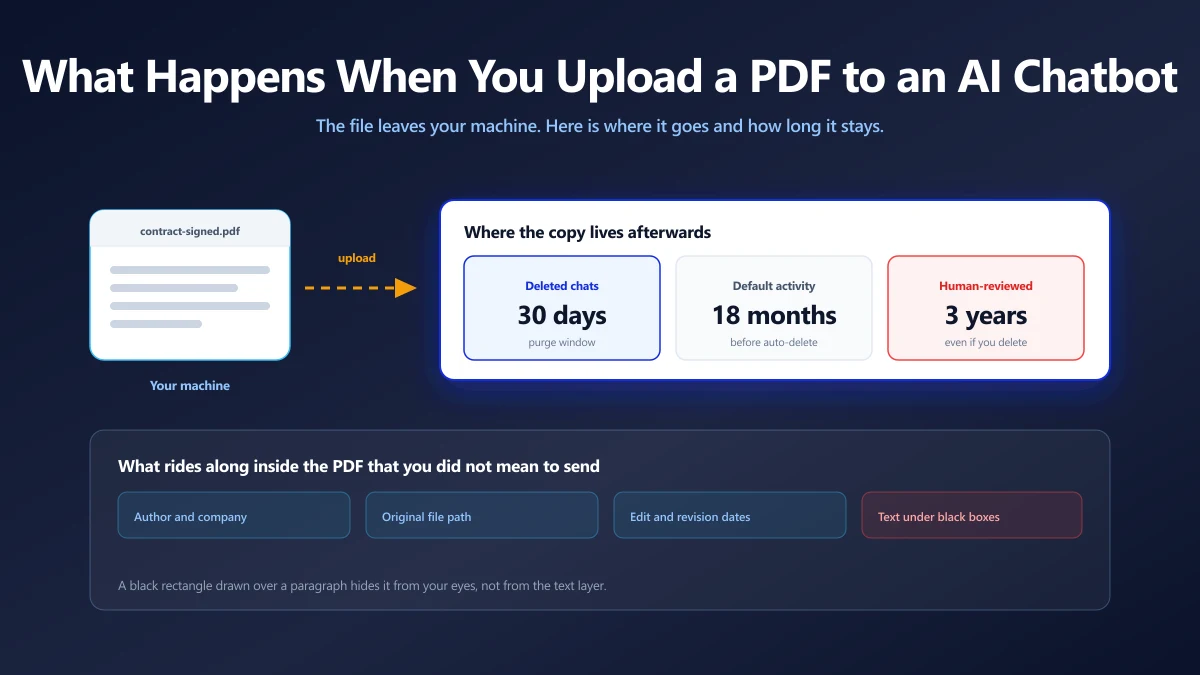
| A conversation you delete | Purged within about 30 days | Deletion is a request to purge, not an instant erase |
| Activity you never delete | 18 months by default on Gemini | Adjustable to 3 or 36 months, or off |
| Chats sampled for human review | Up to 3 years on Gemini | Kept even after you delete your activity |
| Files on enterprise plans | Set by the workspace policy | Usually excluded from training by contract |
The human review path is the one people miss. Google's Gemini Apps privacy notice states that conversations selected for human review are retained for up to three years and are not deleted when you delete your activity. Deleting a chat does not reach a copy that has already been pulled for review.
Training on Your Content
On consumer tiers, content is generally used to improve the models by default, with an opt out available in settings. On enterprise, education and API tiers, providers generally commit contractually not to train on customer content.
If you are using a free account for work documents, you are on the first set of terms, whatever your employer's policy says.
The Thing Retention Policies Cannot Promise
A retention policy describes what a company intends to do. It does not override a court.
In May 2025, a US court ordered OpenAI to preserve output log data in the New York Times litigation, including data that would otherwise have been deleted under its normal 30 day policy. That obligation ran until late September 2025, and in November 2025 the court ordered production of a large volume of de-identified chat logs to the plaintiffs.
Nobody did anything wrong here. It is simply how litigation works, and it is the structural point: data that exists can be compelled, and data that was never transmitted cannot be.
What Your PDF Says That You Did Not Write
Now the part that has nothing to do with the provider, and everything to do with the file. A PDF carries far more than the words on the page.
- ●Author and organisation. Pulled from whoever was logged into the machine that made it.
- ●Creation and modification timestamps. Including edits made long after the visible date on the page.
- ●Producing software and version. Sometimes down to the license holder's name.
- ●The original file path. Which frequently includes a username, a client name or a project codename.
- ●Earlier revisions. Incrementally saved PDFs can retain prior states of the document.
- ●Text hidden under redactions. The most consequential one, and it deserves its own section.
Redaction Is Not a Black Rectangle
Drawing a filled rectangle over a paragraph hides it from your eyes. It does not remove the characters from the content stream. They sit underneath, fully intact.
A human reader sees a black box. Automated text extraction, the exact step an AI chatbot performs first, reads straight through it. This has produced real world disclosures in court filings and published reports for years, and it will keep producing them.
Real redaction removes the underlying content. If you are unsure which kind you have, select the area and copy it. If text lands on your clipboard, so will it land in the model's context.
You can inspect and strip document properties before sharing a file with our <a href="/metadata-editor" class="text-violet-600 dark:text-violet-400 hover:underline font-medium">metadata editor</a> or <a href="/remove-metadata" class="text-violet-600 dark:text-violet-400 hover:underline font-medium">metadata remover</a>, both of which run in your browser. Note that this cleans the document properties, not text concealed behind drawn shapes.
A Decision Table You Can Actually Use
Blanket rules fail because the risk genuinely varies. Sort by two questions: whose information is in the document, and what would happen if it surfaced somewhere you did not choose.
| Document | Consumer chatbot | Better move |
|---|---|---|
| Public report, published paper | Fine | Nothing to change |
| Your own draft writing | Fine | Opt out of training if you care about the text |
| Internal deck marked confidential | Check policy first | Use the enterprise workspace, not a personal account |
| Contract naming a third party | Risky | Their data, not yours to upload |
| Medical records, yours or anyone's | Avoid | Special category data under GDPR |
| Bank statements, tax returns | Avoid | Extract the figures locally first |
| ID, passport, licence scans | Avoid | Highest value target, no upside |
| Anything under NDA | Avoid | Uploading may itself breach the agreement |
If a document contains someone else's personal data, consent is not yours to give. That is the cleanest line in the table and the one most often crossed by accident, usually with a CV or a client contract.
Practical Steps That Actually Reduce Exposure
You do not have to choose between using AI and protecting documents. A few habits cover most of the gap.
Upload the Excerpt, Not the Document
If you need help with clause 14, paste clause 14. The model does not need the parties, the addresses, the account numbers or the signature page to explain an indemnity.
Use a PDF splitter to pull out the pages that matter, entirely on your own machine, and upload only those. This single habit removes most of the exposure in most real cases.
Do the Mechanical Work Locally
A surprising share of what people ask chatbots to do with PDFs is not reasoning at all. It is file manipulation, and file manipulation does not need a model.
- ●Making a scan searchable is OCR, which runs fine in a browser tab.
- ●Getting editable text out is a PDF to Word conversion.
- ●Pulling pages apart or putting them together is splitting and merging.
- ●Making a file small enough to send is compression.
None of these require the document to leave your computer. Reserve the upload for the tasks that genuinely need a model to reason about the content.
Change the Three Settings That Matter
- 1.Turn off model training on your content, in the data controls section of your account settings.
- 2.Shorten the activity retention window if your provider exposes one, rather than leaving the default.
- 3.Use a temporary or incognito chat mode for one off questions, which typically keeps the exchange out of your history entirely.
These take about two minutes and they apply to every future conversation, which makes them the highest leverage thing in this article.
Strip Metadata Before You Share Anything
Worth doing whether the recipient is a chatbot, a client or a job portal. Clear the author, the paths and the revision history, and you remove an entire category of accidental disclosure at once. Our guide to file metadata covers what is in there and why it persists.
The Underlying Principle
Every privacy policy is a promise about behaviour. Promises can be revised, misapplied by a bug, overridden by a court, or broken by an intruder.
The only property that is not a promise is architectural: a file that was never transmitted cannot be retained, trained on, subpoenaed or leaked. That is not a claim anyone has to trust, it is just what happens when the network is not involved.
So the useful question is not whether a provider is trustworthy. It is whether this particular task requires the upload at all. Often it does, and then you go ahead with the settings tightened and the document trimmed. Often it does not, and then the safest version of the task is also the faster one.
For the tasks that do not need a model, our PDF tools run entirely in your browser, with no account and no upload.
Frequently asked questions
Is it safe to upload a PDF to ChatGPT?
Do AI chatbots train on the files I upload?
If I delete the chat, is the file gone?
Can a court order access to my AI conversations?
What hidden information does a PDF contain?
Does a black box over text hide it from an AI?
What is the safest way to get AI help with a confidential document?
Sources & references
This article was researched and written by Nikola, drawing on the following primary sources and documentation:
Ready to try it?
All tools run entirely in your browser, no uploads, no account required.
Remove Metadata