Is iLoveIMG Safe? What Actually Happens to Your Photos When You Upload Them
Summary
Is iLoveIMG safe to use? Here is exactly what happens when you upload a photo, what travels with it, and how to check any image tool yourself in 30 seconds.
iLoveIMG is one of the most-used free tools for resizing, compressing, and converting images online, simple, fast, and free for everyday tasks. But "is it safe" is a fair question for any tool whose entire job is handling files you didn't necessarily plan to hand to a third party. Here's exactly what happens when you use it, how ImagePDF.Tools does the same job without uploading anything at all, and how to check any tool yourself.
How iLoveIMG Processes Your Images
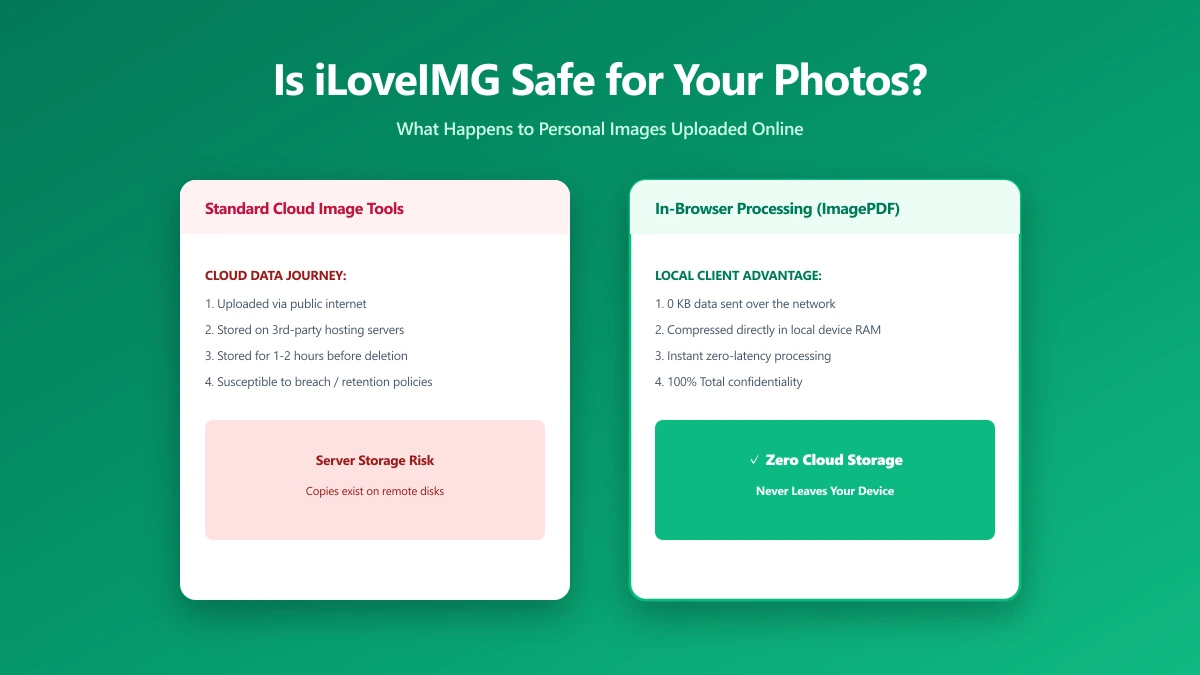
Like almost every free browser-based image tool, iLoveIMG uses server-side processing: your photo is uploaded to its servers, resized, compressed, or converted there, and the result is sent back to you. This is standard, legitimate architecture, not a hidden flaw, but it means your image, and everything embedded inside it, leaves your device the moment you drop it into the tool.
What Actually Travels With Your Photo
A photo is rarely just pixels. Most images carry EXIF metadata, a hidden data layer recording the device model, timestamp, and often the exact GPS coordinates of where the photo was taken. When you upload a photo to any server-side tool, that metadata typically travels with the file, uploaded right alongside the image content itself.
For a holiday photo, that's rarely a concern. For a photo of a home interior, a workplace, an ID document, or a child, uploading it, metadata and all, to a server you don't control is a real and often unnoticed exposure. See our full guide on what image metadata reveals for the complete picture.
Is iLoveIMG Actually Unsafe?
To be fair and specific: there's no public evidence that iLoveIMG mishandles user files, and it operates under standard European data-protection obligations. "Unsafe" isn't the right word for a policy violation that hasn't happened. The more useful question is structural: does the tool need to take custody of your file at all to do its job? For resizing and compressing an image, the honest answer is no, a modern browser can do the entire operation itself, which is exactly how ImagePDF.Tools works.
| Factor | iLoveIMG | ImagePDF.Tools |
|---|---|---|
| Where the image goes | Uploaded to iLoveIMG servers | Never leaves your device |
| Metadata handling | Travels with the upload | Stays local, view or strip it yourself |
| Retention | Governed by iLoveIMG's policy | Nothing to retain, nothing was ever sent |
| Account required | No, for most tools | Never |
| Price | Free tier, paid plans available | Free, permanently |
| How to verify | You have to trust the stated policy | DevTools shows zero upload requests |
Verify this yourself in 30 seconds: open DevTools (F12) → Network tab, drop a photo into the tool, and watch for an outbound request matching your file size. That's the moment your image left your device.
The Photos Where This Actually Matters
- ●ID documents, passports, licences, anything with a face and a name attached
- ●Real estate and interior photos, which can reveal a home's exact location and layout
- ●Photos involving children, where GPS metadata can expose a school or home address
- ●Business and product photography not yet public, unreleased designs, internal documentation
How to Check Any Image Tool Yourself
- 1.Open the tool, press F12, and click the Network tab in DevTools.
- 2.Tick "Preserve log" so requests don't clear between steps.
- 3.Drop in a low-stakes test image, never a sensitive one.
- 4.Watch for a large outbound
POSTrequest sized close to your file, that's an upload. - 5.See only small script requests and nothing matching your file's size? The tool processed it locally.
ImagePDF.Tools: The Same Job, Without the Upload
ImagePDF.Tools compresses, resizes, crops, and converts images entirely inside your browser tab using the Canvas API and WebAssembly, no upload, no account, no watermark, and nothing to retain because nothing was ever received. It's free, permanently, with no daily limits. Our metadata editor also lets you see and selectively strip EXIF data before you share a photo anywhere, uploaded or not.
It does everything most people reach for iLoveIMG to do, compress, resize, crop, convert, watermark, strip metadata, just without ever taking custody of the photo in the first place.
When an Upload-Based Tool Is Still Fine
If the photo is already public, or a leak would cost you nothing, the convenience of a fast, feature-rich upload tool like iLoveIMG is a perfectly reasonable trade. The same rule from our file-safety guide applies here: match the tool to what the photo actually shows, not to whichever result loads first.
The Bottom Line
iLoveIMG isn't a bad tool, it's a fast, capable, server-side one, and that architecture is the entire point worth understanding. For resizing a public photo, it's fine. For anything that reveals a location, an identity, or something not yet public, ImagePDF.Tools removes the question entirely, your photo, and its metadata, never leaves your device.
Try it free: compress an image or check what metadata your photos carry, then confirm in DevTools that nothing was ever uploaded.
Frequently asked questions
Is iLoveIMG safe to use?
What is the difference between ImagePDF.Tools and iLoveIMG?
Does iLoveIMG remove EXIF metadata automatically?
What data does iLoveIMG see when I upload a photo?
How can I check if an image tool uploads my photos?
Sources & references
This article was researched and written by Nikola, drawing on the following primary sources and documentation:
Ready to try it?
All tools run entirely in your browser, no uploads, no account required.
Metadata Editor