Is iLovePDF Safe? What Actually Happens to Your PDF
Summary
Is iLovePDF safe to use? Here is exactly how it processes your PDF, what its 4.9-star Trustpilot rating really tells you, and a private alternative to try.
iLovePDF is one of the most popular PDF tools online, used by millions of people every month to merge, split, compress, and convert files. With that much traffic comes an obvious question: is it actually safe to hand it your PDF?
ImagePDF.Tools does the same everyday PDF jobs without ever uploading your file. Here is exactly how iLovePDF handles yours, what real reviews say, and how to check either tool for yourself.
How iLovePDF Processes Your Files
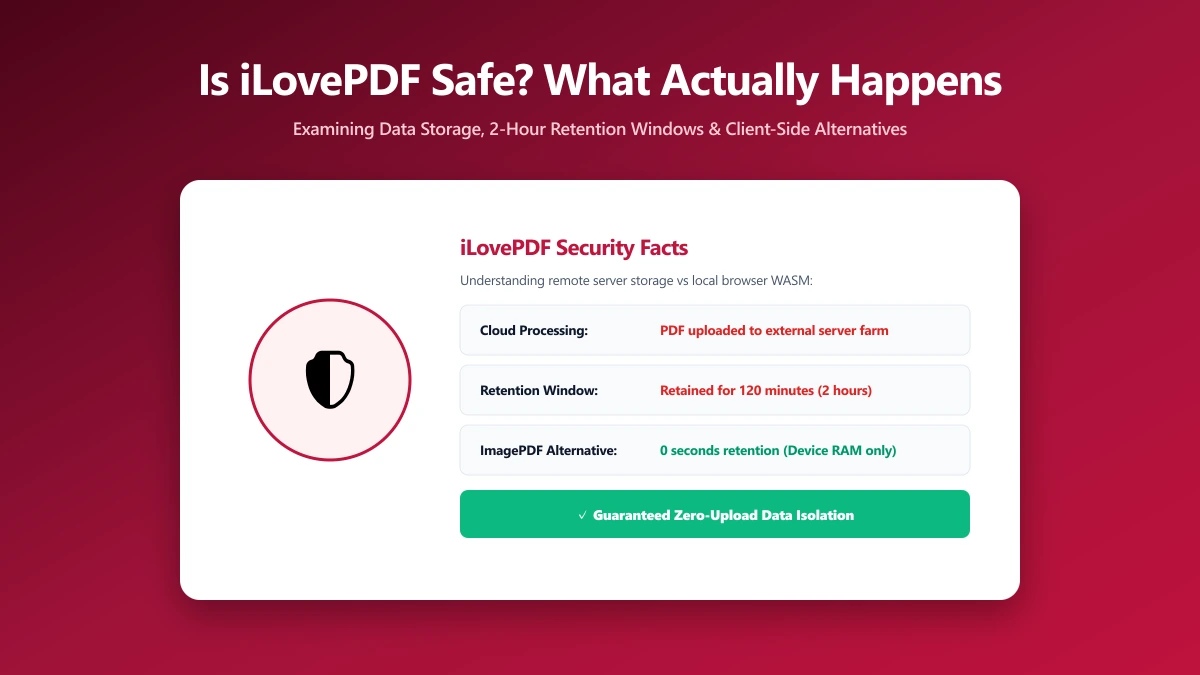
iLovePDF's tools are server-side. When you drop a PDF onto the page, it uploads to iLovePDF's servers, gets processed there, and comes back to you as a finished file. That is standard architecture for a cloud PDF tool, not a hidden flaw.
Practically, that means your file is assigned a temporary link, processed on iLovePDF's infrastructure, and made available to save for a short window afterward before automatic deletion. That workflow is normal for a cloud-based tool, and it is worth understanding rather than assuming.
It does mean your document exists on a third party's infrastructure for some period during and after processing. We cover exactly how long in our piece on how long iLovePDF actually stores your files.
What "Safe" Actually Means Here
"Safe" for an online PDF tool usually collapses three separate questions into one: does it upload your file, does it have real, verifiable security practices, and do other users report problems. iLovePDF answers each of these differently, so it is worth taking them one at a time.
What Public Reviews Say
iLovePDF holds an "Excellent" rating of 4.9 out of 5 on Trustpilot, built from more than 12,000 reviews as of 2026. That is a strong, consistent track record for a free online tool used by millions.
Most of that praise centers on speed and reliability, not a specific audit of the upload process itself. A high review score reflects a good user experience, which is a different claim than a promise about where your file goes.
A 4.9-star rating means people are happy with the tool. It is not the same as a guarantee about upload handling. Whether a tool is well-liked and whether it requires an upload are two separate questions worth answering on their own.
What a Trustpilot Score Does Not Measure
Review platforms capture what users can actually observe: whether the tool worked, how fast support responded, whether billing was clear. They rarely capture infrastructure-level questions like how long a file sits on a server, because ordinary reviewers have no visibility into that layer at all.
That is not a knock on iLovePDF specifically, it is true of review platforms in general. A 4.9 rating is genuine evidence the product works well for most people. It is not independent evidence about data handling, which comes from the provider's own published policy instead.
The Security Certifications Behind the Rating
iLovePDF states it encrypts files with HTTPS in transit, holds ISO/IEC 27001 certification for information security management, and complies with GDPR for EU users. These are standard, verifiable claims for an established service, not marketing language unique to iLovePDF.
None of these certifications changes the underlying fact that a copy of your file exists on iLovePDF's servers during processing. Encryption and certification reduce the risk during that window, they do not remove the window itself.
Is iLovePDF Actually Unsafe?
No public evidence suggests iLovePDF mishandles user files. It publishes a clear retention policy, holds the certifications above, and operates under GDPR. On paper, it is a well-run, established service with nothing pointing to misuse.
This is not unique to iLovePDF. Every server-side PDF tool works this way, the file has to reach a server to be processed there. The distinction that actually matters is whether the task needs a server at all.
The more useful question, as with any cloud PDF tool, is structural: does the task actually require an upload at all? For merging, splitting, or compressing a PDF, it does not, a browser can do the entire job locally.
When the Upload Question Actually Matters
For a flyer, a marketing one-pager, or a document you would not mind a stranger briefly glancing at, none of this changes much. For a narrower set of documents, it is worth pausing before uploading anywhere at all.
- ●Signed contracts and NDAs, where confidentiality is often a contractual obligation, not just a preference.
- ●Client files in regulated work, legal, medical, or financial documents with compliance requirements attached.
- ●Personal ID scans, passports, licences, and anything else that identifies you specifically.
- ●Unreleased business documents, financial models, drafts, or anything under an NDA of your own.
iLovePDF vs ImagePDF.Tools
| Factor | iLovePDF | ImagePDF.Tools |
|---|---|---|
| Where your file goes | Uploaded to iLovePDF's servers | Never leaves your device |
| Trustpilot rating | 4.9/5, Excellent (12,000+ reviews) | N/A, no upload to review |
| Standard file retention | 2 hours (see full breakdown) | Nothing to retain |
| Account required | No, for most tools | Never |
| Price | Free tier, then from $9/month | Free, permanently |
Verify It Yourself in 30 Seconds
- 1.Open the tool, press F12, and click the Network tab in DevTools.
- 2.Tick "Preserve log" so nothing clears between steps.
- 3.Run a compression or conversion on a test PDF, never a sensitive one.
- 4.Watch for a large outbound
POSTrequest the size of your file, that is an upload.
When iLovePDF's Reputation Is Enough
For a public flyer, a marketing PDF, or anything you would not mind a stranger briefly seeing, an established, well-reviewed, GDPR-compliant tool like iLovePDF is a reasonable choice. Our full feature comparison covers where it still wins in the iLovePDF alternative guide.
For a signed contract, a scanned ID, or anything under NDA, the calculation changes, not because iLovePDF is untrustworthy, but because a tool that never uploads removes the question completely. The same logic applies to its sister product, covered in is iLoveIMG safe for your photos.
The Bottom Line
iLovePDF is a genuinely well-regarded tool with a 4.9-star Trustpilot rating and no public evidence of misuse. It still requires an upload for every single job. ImagePDF.Tools does the same everyday work with your file never leaving your device.
Try it free: compress a PDF, then confirm in DevTools that nothing was ever uploaded.
Frequently asked questions
Is iLovePDF safe to use?
What is iLovePDF's Trustpilot rating?
Does iLovePDF store my files after processing?
Is there a PDF tool that never uploads my file?
How do I check whether a PDF tool is uploading my file?
Sources & references
This article was researched and written by Nikola, drawing on the following primary sources and documentation:
Ready to try it?
All tools run entirely in your browser, no uploads, no account required.
Compress PDF