
Browser-Based PDF Tools: What They Are and Why They Work Differently
Summary
How browser-based PDF tools differ from the upload-based converters most people use, how the architecture works, and where the limits are.
Most PDF tools you have used online work the same way: upload a file, a server processes it, you download the result. Browser-based PDF tools skip that entire round trip, the merging, splitting, compressing, or editing happens directly inside your browser tab, using your own device's processing power instead of someone else's server.
What Makes a Tool "Browser-Based"
A browser-based tool loads a PDF into memory using JavaScript, performs the requested operation using WebAssembly, a technology that lets near-native-speed code run inside a web page, and writes the result back out, all without a network request carrying your file anywhere. The tool runs the same code a server-side version would, it just runs it on your machine instead.
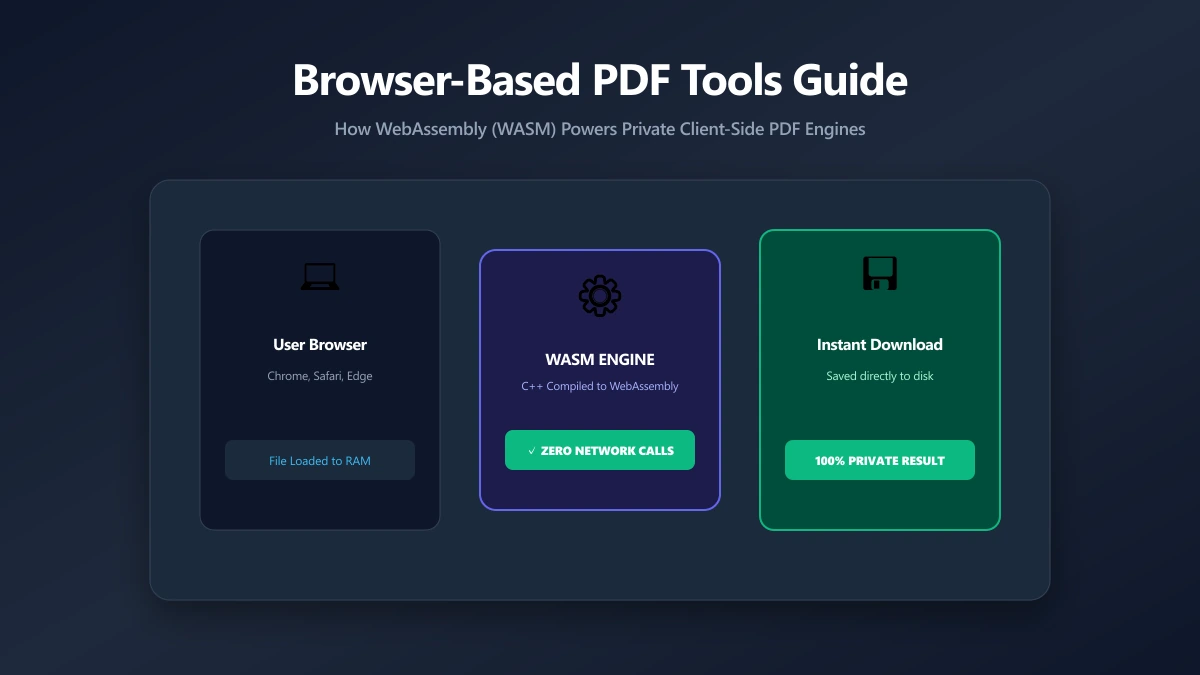
How This Differs From a Normal Online PDF Tool
| Factor | Server-based (typical) | Browser-based |
|---|---|---|
| Where processing happens | A remote server | Your own device |
| Is the file uploaded? | Yes | No |
| Retention policy needed? | Yes, files exist on a server temporarily | No, nothing is ever received |
| Works offline once loaded? | No, requires a connection for every operation | Often yes, after the page has loaded |
| Daily or hourly limits | Common, tied to server capacity | Rare, limited only by your device |
Why It Matters
The practical benefit is not abstract. A browser-based tool has nothing to leak, log, or retain, because it never receives your file in the first place. It also tends to be faster for smaller files, since there is no upload or download time, and it keeps working even on a flaky connection once the page itself has loaded.
Where to Find Browser-Based PDF Tools
ImagePDF.Tools runs its entire PDF toolkit this way: merge, split, compress, edit, protect, watermark, and organize PDFs, all without a single upload. Not every PDF tool online works this way, some are hybrids, PDF24 and Foxit are two examples we have looked at closely that mix local and server-side processing depending on the specific tool.
You can tell a browser-based tool from a server-based one in under a minute: open DevTools (F12) → Network tab, run the operation, and look for a large outbound upload request. If there is not one, it is genuinely browser-based.
Where Browser-Based Tools Still Fall Short
To be fair: some operations genuinely benefit from server power, large-batch OCR across hundreds of pages, real-time collaborative e-signature workflows, or extremely large file conversions that would strain a phone's memory. Browser-based tools are catching up quickly, but for now those specific workloads are still where server-side tools have an edge.
The Bottom Line
Browser-based PDF tools do the same everyday jobs as server-based ones, merging, splitting, compressing, editing, without the upload, the retention window, or the daily limits that come with sending your file somewhere else first.
Try it now: edit a PDF or merge one, entirely in your browser.
Frequently asked questions
What is a browser-based PDF tool?
Are browser-based PDF tools slower than server-based ones?
Do browser-based PDF tools work without an internet connection?
How do I know if a PDF tool is really browser-based?
Which ImagePDF.Tools features are browser-based?
Sources & references
This article was researched and written by Nikola, drawing on the following primary sources and documentation:
More in Technical

How to Repair and Recover Corrupted PDF Files That Won't Open (Recovery Guide)

How to Convert CMYK PDF to sRGB for Web and Social Media Sharing (True Color Guide)

Why Is My Printer Printing PDF Pages in Landscape Instead of Portrait? (Orientation Fix)