
Best Image Format and Dimensions for Website Favicons and App Touch Icons (2026 Guide)
Summary
Which favicon and touch icon files a site needs in 2026, the exact pixel sizes and formats, the HTML tags, and why a new icon often fails to show up.
Most sites need four icon files, not twenty: a favicon.ico at 32x32 pixels, an icon.svg for modern browsers, an apple-touch-icon.png at 180x180 for iPhones and iPads, and, only if you publish a web app manifest, PNGs at 192x192 and 512x512 plus a 512x512 maskable version. Four lines of HTML wire them up.
The long lists of sizes that older generators produce date from a time when every browser and tablet wanted its own file. Browsers now scale down a larger icon well, so the extra files mostly add clutter to your head tag.
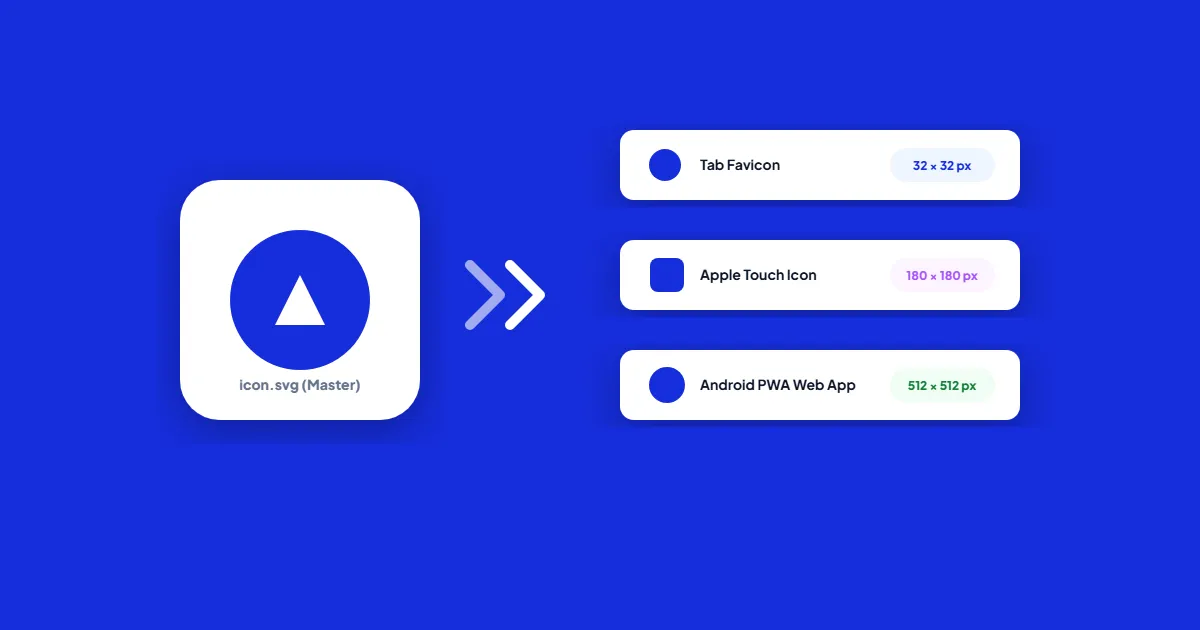
The Files and Their Exact Sizes
| File | Pixel size | Format | Used by |
|---|---|---|---|
| favicon.ico | 32 x 32 | ICO | Older browsers, feed readers, tools that request /favicon.ico directly |
| icon.svg | Any (vector) | SVG | Chrome, Edge, Firefox, and Safari 26 or later |
| apple-touch-icon.png | 180 x 180 | PNG, solid background | iOS and iPadOS home screen bookmarks |
| icon-192.png | 192 x 192 | PNG | Android home screen for installed web apps |
| icon-512.png | 512 x 512 | PNG | Splash screen while an installed web app loads |
| icon-mask.png | 512 x 512 | PNG with padding | Android launchers that crop icons to circles or other shapes |
The last three only matter if your site has a web app manifest, which is what lets visitors install it like an app. A plain content site can stop after the first three.
The HTML to Put in Your Head Tag
<link rel='icon' href='/favicon.ico' sizes='32x32'>
<link rel='icon' href='/icon.svg' type='image/svg+xml'>
<link rel='apple-touch-icon' href='/apple-touch-icon.png'>
<link rel='manifest' href='/manifest.webmanifest'>
The sizes='32x32' on the ICO line matters. Without it, Chrome can pick the ICO over the SVG. Keep both files in the site root as well: browsers and many other tools request /favicon.ico even when no tag points to it, and iOS looks for /apple-touch-icon.png in the root when no link element names one.
If you have a manifest, its icon list looks like this:
"icons": [
  { "src": "/icon-192.png", "type": "image/png", "sizes": "192x192" },
  { "src": "/icon-512.png", "type": "image/png", "sizes": "512x512" },
  { "src": "/icon-mask.png", "type": "image/png", "sizes": "512x512", "purpose": "maskable" }
]
Give the maskable icon its own entry. Marking one file as both any and maskable means the padding a maskable icon needs also shows up wherever the regular icon is used.
What Each Format Is Good At
SVG: sharp at every size, and it can follow dark mode
A vector icon stays crisp on any screen density, and it can carry its own CSS. A media query inside the file switches colors when the visitor's system uses a dark theme, so a black logo does not vanish on a dark tab:
<svg xmlns="http://www.w3.org/2000/svg" viewBox="0 0 32 32">
  <style>
    path { fill: #1e1b4b; }
    @media (prefers-color-scheme: dark) { path { fill: #ffffff; } }
  </style>
  <path d="M4 4h24v24H4z"/>
</svg>
Safari only gained SVG favicon support in version 26, so visitors on older Apple devices fall back to the ICO. Draw the SVG for small sizes: a 16 pixel tab has no room for a wordmark or thin lines, so use a simplified mark rather than your full logo.
ICO: the fallback that never goes away
One 32x32 image inside the ICO is enough. Browsers scale it to 16x16 when needed. Add a hand-tuned 16x16 layer only if the scaled version looks muddy. Make it with a real converter rather than renaming a PNG. With ImageMagick, magick icon-32.png favicon.ico does it.
PNG: touch icons, app icons and search results
iOS ignores SVG for home screen icons and applies its own rounded corners, so supply a square 180x180 PNG with a solid background. Transparent areas do not stay transparent on the home screen, and they tend to look dark or unfinished. About 20 pixels of padding on each side, putting the logo in roughly the middle 140x140, keeps it from feeling cramped.
Google Search shows a favicon next to your results and does not accept SVG for that. It wants a square icon of at least 8x8 pixels in a format such as ICO or PNG, and recommends larger than 48x48. Google also reads apple-touch-icon links, so the 180x180 PNG gives it a sharp option.
For the maskable icon, keep everything important inside a centered circle whose radius is 40% of the icon width. Android may crop away the outer 10% on every side. maskable.app lets you preview the common shapes.
Making the Files From One Master Image
- 1.Start from a square master: an SVG, or a PNG of at least 512x512 pixels.
- 2.Make the 180x180 touch icon by placing the logo on a solid background with padding, then the 512, 192 and 32 pixel PNGs. Resize Image sets exact pixel dimensions in your browser with the aspect ratio locked.
- 3.Shrink the PNGs. Icons use few colors, so Compress PNG usually cuts them a long way without visible change. Compare the result at full size before keeping it.
- 4.Convert the 32 pixel PNG to favicon.ico.
- 5.Upload everything to the site root, add the tags, and test in a private window on desktop and on a phone.
Why the New Icon Does Not Show Up
Browsers cache favicons separately from pages and hold on to them stubbornly. Open /favicon.ico directly and force a reload, or check in a private window. If you want returning visitors to get the new icon promptly, give the file a new name or add a version to the link, such as /icon.svg?v=2. In search results, Google updates the icon only after it recrawls your home page, which can take from several days to several weeks.
Frequently asked questions
Do I still need a favicon.ico file?
Can I use a PNG favicon instead of ICO?
Should the apple-touch-icon have rounded corners?
Can I use WebP for a favicon?
Sources & references
This article was researched and written by Nikola, drawing on the following primary sources and documentation:
- ●WHATWG HTML Living Standard, the icon link type
- ●Apple Safari Web Content Guide, specifying a webpage icon for Web Clip
- ●Google Search Central, define a favicon to show in search results
- ●web.dev, adaptive icon support with maskable icons
- ●Evil Martians, how to favicon: six files that fit most needs
- ●Can I use, SVG favicon browser support
Ready to try it?
All tools run entirely in your browser, no uploads, no account required.
Resize ImageMore in Performance & SEO
How to Fix "PDF Exceeds Maximum File Size Limit" on arXiv and Academic Portals
How to Optimize Images for Apple Retina and High-DPI Screens Without Bloating Page Weight
Why Do Animated GIFs Look Grainy? (And How to Convert to Smooth Animated WebP)