
Does Naming Your Resume 'Final' or 'Updated' Hurt Your Chances?
Summary
Is naming your resume final or updated a bad idea? Learn how recruiters view file version numbers and what to do instead.
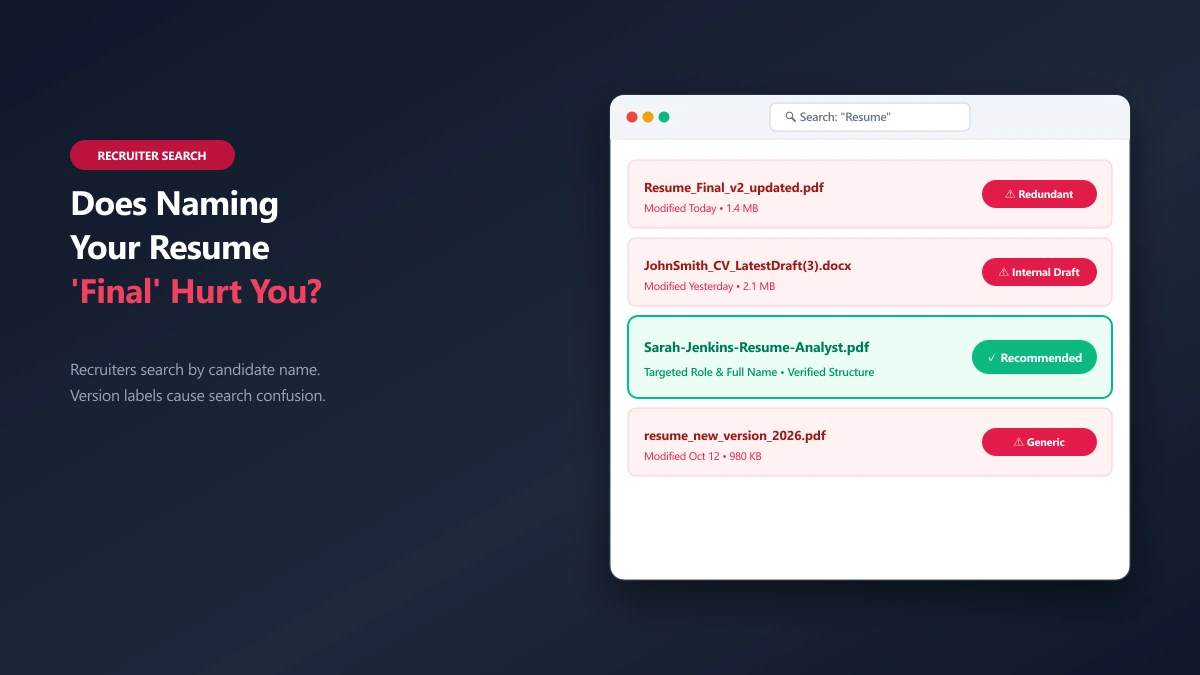
Everyone focuses on the words inside their resume. Job seekers spend days refining bullet points, polishing action verbs, and quantifying achievements. Yet, many of these same candidates spend less than three seconds deciding what to name the file itself before uploading it. They save it as resume_final.docx, resume_updated_2026.pdf, or even resume_final_v2_UPDATED(3).docx.
This is a subtle but common mistake. While a poorly named file will rarely disqualify a top-tier candidate on its own, it sends immediate, unintended signals to recruiters and hiring managers. Before anyone reads your professional experience, they read your filename. That filename is the first line of presentation your application offers, and it can either project meticulous attention to detail or suggest a disorganized, rushed submission.
Here is the objective reality of how version labels like "final" or "updated" impact your hiring process, what they signal to recruiters, and how to structure your files professionally.
The Recruiter’s Inbox: A Sea of Identical Files
To understand why filenames matter, you must first picture the environment where your application lands. Recruiters do not look at your resume in isolation. Instead, they work within Applicant Tracking Systems (ATS) or downloads folders that aggregate hundreds of files for a single open role.
When a hiring manager downloads a batch of applications to review, they are often looking at a file directory list. In a folder of one hundred resumes, a generic or cluttered filename stands out for all the wrong reasons.
Imagine looking at this list: resume.pdf resume_final.pdf CV_2026.docx final_resume_updated.pdf * Alex-Mercer-Resume-Data-Analyst.pdf
Four of these files are indistinguishable from one another without opening them. One of them is immediately clear: it tells the recruiter exactly whose file it is, what the document is, and which role it belongs to.
Why Version Labels Signal Carelessness
When you attach the word "final" or "updated" to a file, you are naming the document for yourself, not for the recipient.
Recruiters do not need to know that this is the final version of your writing process; to them, every submission should be the definitive, polished version. Using internal version tracking labels in a public submission signals three main weaknesses:
- 1.Rushed Execution: A name like
resume_final_v2.pdfsuggests you were editing the document right up to the submission deadline and grabbed the file in a hurry. - 2.Lack of Recipient Focus: It shows you did not think about how the file would look on the recruiter\'s screen. A professional document should always be named from the perspective of the reader.
- 3.Disorganization: When files are named
final_v2orupdated_new, it implies your local desktop is cluttered with multiple drafts, and you are struggling to maintain version control.
Filename Signals: What Your File is Telling Recruiters
Before a recruiter clicks "Open," your filename has already started telling a story. Here is a breakdown of common naming conventions and the exact message they send:
| Filename Example | Recruiter\'s Perception | Professional Risk |
|---|---|---|
resume.pdf or cv.docx | Generic and mass-sent. The candidate is likely applying to dozens of roles in bulk without tailoring their application. | High risk of being lost in a shared folder with other "resume.pdf" files. |
resume_final_v2.docx | Careless version control. The candidate is sharing their internal drafting process. | Minor polish penalty. Suggests lack of attention to file details. |
resume_for_AcmeCorp.pdf (sent to Globex) | Major mistake. The candidate tailored the file for a competitor and forgot to rename or update it. | High risk. Indicates carelessness and suggests the employer is a second choice. |
Untitled document.pdf | Extreme lack of detail. The file was exported and submitted without a second glance. | Moderate risk. Suggests low digital literacy or complete lack of interest. |
Alex-Mercer-Resume-Data-Analyst.pdf | Clean, professional, and structured. Designed specifically for the reader. | None. This is the gold standard for filename presentation. |
The Hidden Vulnerability: Document Metadata
The filename is not the only place where your version history leaks. A more serious issue is hidden inside the document\'s metadata.
When you export a file from Microsoft Word or Google Docs, the software automatically embeds hidden information in the file properties. This metadata can include: The original author\'s name (which might belong to your current employer, a friend, or a university lab) The company name associated with the software licence The exact folder path on your computer (e.g., C:/Users/Admin/Desktop/JobSearch2026/Drafts/resume-final-v3.docx) The creation date and last modified date
If you draft your resume at your current job using a company-issued computer, the metadata will often list your current employer in the "Author" or "Company" field. When a recruiter at a new company opens your PDF properties, they will see that you used your current employer’s resources to write your application.
How to Check and Clear File Metadata
To protect your privacy and ensure your application remains clean, you should strip this hidden data before submitting.
- 1.On Windows: Right-click the PDF -> properties -> Details -> click "Remove Properties and Personal Information."
- 2.On Mac: Open the file in Preview -> Tools -> Show Inspector -> click the Info tab to view and clear fields.
- 3.In-Browser: If you want a quick, zero-upload method to clean your files, use a local metadata remover. You can run files through our remove metadata tool. Because it operates entirely via WebAssembly in your browser tab, your document is never sent to an external server. You can check the fields first using the metadata editor.
Does Naming a Resume \'Final\' Hurt ATS Parsing?
A common anxiety among job seekers is whether a bad filename will cause the Applicant Tracking System (ATS) to reject their resume.
The short answer is no. Modern ATS platforms (such as Workday, Greenhouse, Taleo, and Lever) parse the text content inside the file. They extract your contact info, experience, and skills using optical character recognition (OCR) and text extraction libraries. The filename itself does not affect how the ATS parses your work history or calculates your keyword match score.
However, the ATS is only the first filter. Once your resume passes the automated scan, it is handed off to a human recruiter. This is where the filename returns to do its work. When the recruiter downloads your resume to their machine or forwards it to the hiring manager via email, a professional filename ensures your document remains easy to search, sort, and associate with your name.
The Professional Naming Formula
To remove any risk of looking unprofessional, adopt a standardized naming formula for every application. The optimal filename should include: 1. Your First and Last Name 2. The Document Type (Resume, CV, Cover Letter) 3. The Target Role (optional, but highly recommended for tailored submissions)
Recommended Pattern:
FirstName-LastName-Resume-Role.pdf
Concrete Examples:
- ●Standard Resume:
Sarah-Jenkins-Resume.pdf - ●Tailored Resume:
Sarah-Jenkins-Resume-SeniorAccountant.pdf - ●Matching Cover Letter:
Sarah-Jenkins-CoverLetter-SeniorAccountant.pdf
Naming Conventions to Follow:
- ●Use Hyphens or Underscores: Avoid spaces in filenames. While modern operating systems support spaces, some older corporate portal databases convert spaces into
%20, turning your clean name intoSarah%20Jenkins%20Resume.pdf. Hyphens (-) or underscores (_) are universally safe. - ●Capitalize the First Letter of Each Word: This keeps the filename readable at a glance in narrow inbox lists.
- ●Omit Dates: Do not include dates like
-2026or-Augustin the file you send. It implies the resume has an expiry date or that you have not updated it recently.
A Clean Version Control System (For Your Eyes Only)
You will inevitably need to maintain multiple versions of your resume as you tailor your experience for different job openings. To keep your work organized without sending version numbers to employers, keep the versioning system on your local drive and export clean files for submission.
Here is how to set up a clean, professional workflow:
graph TD
    A[Master Resume File: Sarah-Jenkins-Master.docx] --> B(Create Copied Version for Acme Corp)
    B --> C[Local Draft: Acme-Resume-Draft-v1.docx]
    C --> D[Final Local Draft: Acme-Resume-Draft-v3.docx]
    D --> E[Export to clean PDF: Sarah-Jenkins-Resume-FinancialAnalyst.pdf]
    E --> F{Upload to Acme Portal}
By organizing your files in folders named after each target company, you can keep the internal files named draft_v3.docx for your own edits, while the PDF you actually export and upload remains clean, professional, and completely free of version labels.
The Pre-Flight Checklist: What to Verify Before You Upload
Before you click the upload button or hit send on your application email, run through this quick file check to ensure your presentation is flawless:
- ●[ ] Is the filename clean? Confirm there are no version numbers, internal draft tags, or references to other employers.
- ●[ ] Is the extension correct? Ensure your PDF is actually a PDF, not a renamed Word document.
- ●[ ] Is the metadata stripped? Verify that the author field does not list a previous employer or a personal laptop identifier.
- ●[ ] Is the formatting locked? Open the PDF to confirm that lines have not shifted and fonts look exactly as intended.
- ● ] Is the file size under 2MB? Many portals reject files larger than 2MB without giving a clear error message. If your file is too large due to embedded logos or photos, compress it using a local [PDF compressor to preserve layout quality while shrinking the file size.
The Bottom Line
A filename like resume_final.pdf will not get your application thrown in the trash, but it wastes a valuable opportunity to present yourself as polished and detail-oriented.
Take the extra five seconds to rename your file to Firstname-Lastname-Resume-Role.pdf before uploading. It ensures your document is easily searchable in the recruiter’s downloads folder, looks intentional, and removes one more potential point of friction between you and an interview.
If you have finished editing your document and need to lock in the layout, use our browser-native Word to PDF tool. It handles the format change entirely on your device, keeping your private data secure while exporting a clean, professionally named document ready for upload.
Frequently asked questions
Does naming a resume file \'final\' hurt my chances of getting hired?
Should I put the current year or month in my resume filename?
What is the safest separator to use in a resume file name?
-) or underscores (_) are the safest separators. Spaces are generally fine on desktop computers, but older web portals and tracking databases often replace spaces with %20, which makes the filename look cluttered.How do I handle version numbers when tailoring my resume for different companies?
YourName-Resume-Role.pdf so the employer never sees the version history.Can recruiters see my document\'s edit history or edit properties?
.docx), the recruiter can view your revision history, metadata, and draft comments. If you export the file to PDF, the revision history is stripped, but document metadata (like Author and Company) will still remain unless you remove it.Sources & references
This article was researched and written by Nikola, drawing on the following primary sources and documentation:
Ready to try it?
All tools run entirely in your browser, no uploads, no account required.
Compress PDFMore in Productivity
What Is the Best YouTube Thumbnail Size, Resolution, and Aspect Ratio? (2026 Specs)
How to Compress Huge Photoshop PSD Files for Client Email Preview (Export Guide)
How to Convert Scanned PNG Receipts to Searchable PDF With OCR (Tax & Expense Guide)