
Should Your Resume File Name Include Your Full Name?
Summary
Should you put your full name in your resume file name? Learn the optimal naming rules for human recruiters and online portals.
When you finish editing your resume, saving the document is the final step. Yet, many job seekers use generic names like resume.pdf or abbreviated names like J_Doe_CV.pdf without a second thought.
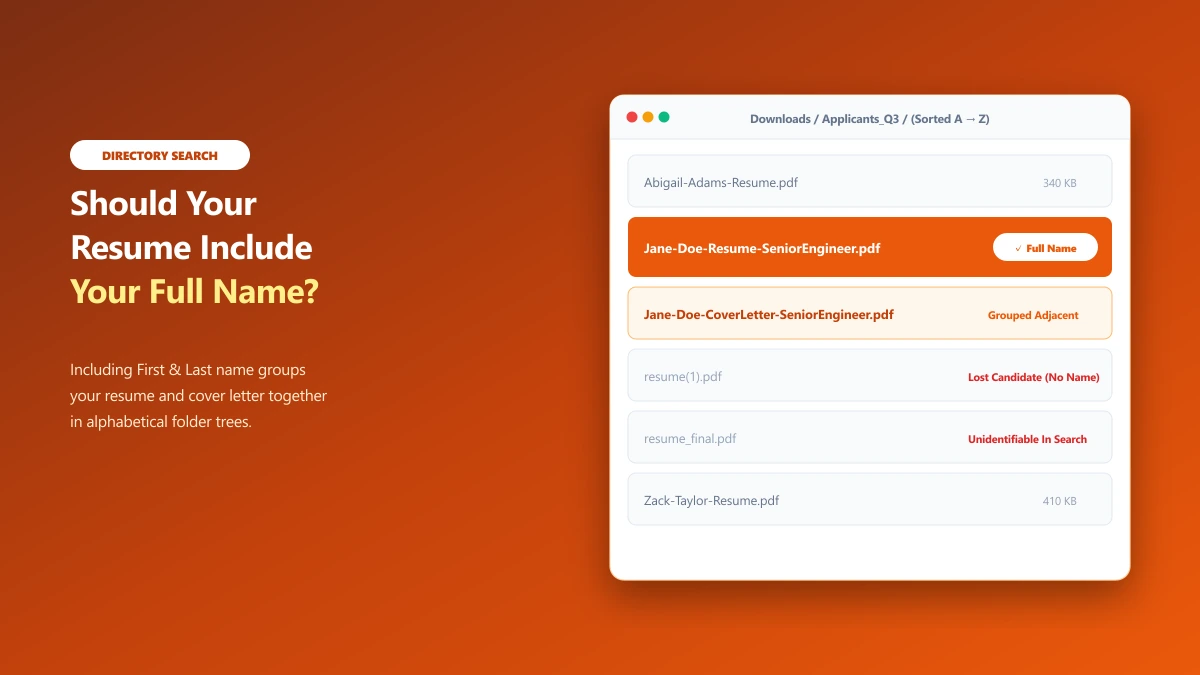
You should always include your full first and last name in your resume filename. A filename is a critical piece of presentation. It is the first identifier a recruiter reads in their downloads list or database query, and it outlasts your initial application.
Here is why including your full name in your resume file name is mandatory, what other details to include or exclude, and how to format your name correctly for online systems.
Why Your Full Name is Mandatory: The Recruiter\'s Perspective
Hiring managers and recruiters manage massive volumes of files. When a job posting closes, a recruiter might download eighty resumes into a single local directory.
If you name your file resume.pdf, it looks identical to ten other files in that directory. The recruiter\'s computer will automatically rename your file to resume(1).pdf or resume(2).pdf to prevent it from overwriting existing files. Once this happens, your name is completely separated from the file. If the recruiter wants to search their local drive for your resume a week later, typing your name into the system will yield zero results.
Including your full name solves this problem: Instant Identification: The recruiter knows whose file it is without opening it. Searchability: Your file remains searchable by name on the recruiter\'s local drive or within their company\'s email server. * Professional Polish: It shows you took the time to package your application for the reader, not just for your own desktop storage.
Preferred Name vs. Legal Name in Filenames: Branding vs. Compliance
A common dilemma for job seekers is whether to use their legal name or their preferred name in their filename. This occurs frequently with candidates who use a shortened version of their name (e.g., Alex instead of Alexander, Angie instead of Angelina) or candidates with non-Western names who use an adopted English name for professional branding.
The rule of thumb for filename presentation is consistency with your resume header.
- ●The Branding Rule: If the top of your resume reads
Alex Mercer, your filename should beAlex-Mercer-Resume.pdf. Using your legal nameAlexander Mercerin the filename while usingAlexinside the document creates minor cognitive friction for the recruiter. - ●The Application Alignment: When you submit your application through an online form, you will usually be asked for your legal name for payroll and background check purposes, alongside a "preferred name" field. Ensure the filename matches your preferred name, as this is the name the recruiting team will use during interviews.
- ●The Legal Exception: You do not need to use your legal name in your public filename. The background check and legal verification occur at the end of the hiring process, and HR departments are fully accustomed to discrepancies between hiring profiles and legal payroll files. Focus your filename on your professional brand.
What Details Should a Resume Filename Carry?
A professional filename needs to carry exactly enough information to identify the document and its purpose, and nothing more. The three essential elements are:
1. Your First and Last Name
Use the same name that is written at the top of your resume. Avoid using nicknames, initials, or middle names unless you use them on your application form. Good: Jane-Doe... Avoid: J-Doe... or Jane-Marie-Doe... (unless you consistently use Marie on your application).
2. The Document Type
Identify what the document is. Use "Resume" or "CV" depending on your location and industry standards. This ensures the recruiter does not confuse your resume with your cover letter or references. Good: ...-Resume... Avoid: ...-File... or ...-Doc...
3. The Target Role (Recommended)
Tying your name to the specific role you want shows that your application is tailored and deliberate. It also helps internal routing. Good: ...-ProductDesigner.pdf Avoid: ...-JobApp.pdf
Candidate Name Layouts: What to Use and What to Avoid
How you write your name inside the filename matters. Compare these layout options:
| Filename format | Status | Reason |
|---|---|---|
Jane-Doe-Resume.pdf | Recommended | Clean and readable. Easy to search and sort. |
Jane_Doe_Resume.pdf | Professional | Equally safe. Underscores are highly compatible with databases. |
J-Doe-Resume.pdf | Acceptable | Decent, but can cause confusion if another candidate has the same initial. |
JaneMarieDoeResume.pdf | Acceptable | Harder to read at a glance without word separators. |
resume.pdf | Incorrect | Contains no name. High risk of getting lost or overwritten. |
JD-Resume-2026.pdf | Incorrect | Too abbreviated. The recruiter will not search for "JD" when looking for Jane Doe. |
The Alphabetical Sorting Trade-Off: First-Last vs. Last-First
Filenames in a recruiter’s download directory are sorted alphabetically by default. If your file name starts with your first name (e.g., Jane-Doe-Resume.pdf), the operating system will sort it under the letter "J".
Some career advisors recommend starting with your last name (e.g., Doe-Jane-Resume.pdf) so the recruiter’s folder matches the traditional alphabetical order of last names.
Let\'s look at the trade-offs: FirstName-LastName (Standard): This is the natural reading order for humans. When a recruiter looks at a list of files, they read Jane-Doe faster than Doe-Jane. It is the modern default for most web submissions. LastName-FirstName (Alternative): This groups all resumes by family name. If a recruiter downloads files for a large team and sorts them by last name, this layout keeps your file in their expected order.
Both styles are professional. The key is to remain consistent across all your files. If you choose Doe-Jane-Resume.pdf, name your cover letter Doe-Jane-CoverLetter.pdf to keep the package sorted together.
Suffixes, Initials, and Periods: The Double Extension Bug
If you have a name suffix (such as Jr., Sr., or III) or use a middle initial, you must be careful with punctuation.
Many candidates save their files as John-Smith-Jr.-Resume.pdf. However, database parsers read filenames from right to left, checking for the first period (.) to determine the file extension.
When a portal scans John-Smith-Jr.-Resume.pdf, older validation scripts can get confused by the period in Jr. and read the extension as .Jr.-Resume.pdf. This is a common error known as the double extension validation bug. The portal will flag the upload as an unsupported format and block the submission. * The Fix: Never use periods, commas, or parentheses inside a filename. If you want to include your suffix or initial, write them without punctuation: John-Smith-Jr-Resume.pdf or John-M-Smith-Resume.pdf.
Privacy on Public Boards: GDPR and Data Retention
When you apply directly to a company portal, your filename is only visible to the internal hiring team. However, if you upload your resume to public job boards (such as Indeed, Monster, or ZipRecruiter), the file is indexed in a public database.
Under privacy frameworks like GDPR (General Data Protection Regulation) or CCPA (California Consumer Privacy Act), you have rights over how your data is stored. But once a file is downloaded by a third-party recruiter, enforcing deletion is difficult.
If you are concerned about public search engines indexing your full name alongside the word "resume," you can use a slightly more generic filename (such as J-Doe-Resume.pdf or JD-Resume-Marketing.pdf) for public board uploads. This protects your privacy during active search. Once you enter direct discussions with an employer, send the fully named file (Jane-Doe-Resume-MarketingManager.pdf) to their direct email.
What to Exclude From the Filename
To keep the filename clean and professional, exclude the following items:
- ●Dates: Do not include months or years (like
Jane-Doe-Resume-2026.pdf). It implies the resume has an expiry date or suggests you have not updated it recently. - ●Version Numbers: Exclude labels like
v2,final,updated, ordraft. Naming your fileresume_final.pdfprojects disorganization. Keep version numbers in your private local folder structure instead. - ●Current Employer Name: Do not include the name of your current employer in the filename (e.g.,
Jane-Doe-Resume-CurrentCompany.pdf). It draws unnecessary attention to your current employment. - ●Target Company Name: Unless explicitly requested by the portal, avoid adding the target company name to the file (e.g.,
Jane-Doe-Resume-Google.pdf). If you apply to multiple roles and accidentally send a file containing a competitor\'s name, your application is finished.
Match Your Name Inside the Document
Ensure that the name in your filename matches the name at the top of your resume. If your filename is Jane-Doe-Resume.pdf but your resume heading lists you as Mary Jane Doe, it creates immediate confusion for the recruiter.
Additionally, verify that your document\'s properties match your filename. Word processors embed an "Author" property inside files, which is visible in the PDF properties. If you drafted your resume on a company laptop, the properties will often list your current employer as the author.
To clear this hidden details before sending: 1. Strip the file properties using your operating system\'s file settings. 2. Alternatively, use a local, zero-upload tool. Our remove metadata tool strips all author, company, and location tags entirely in your browser using WebAssembly. Your resume never leaves your computer to be cleaned.
The Bottom Line
Always put your full first and last name in your resume file name. Use hyphens, skip version numbers, and avoid spaces. A name like FirstName-LastName-Resume-Role.pdf is clean, professional, and ensures your application is easy to find, sort, and associate with you.
If you have finished editing your Word resume and need to convert it, run it through our secure, browser-native Word to PDF tool. It handles the format change entirely on your device, preserving your custom filename while keeping your private contact details secure.
Frequently asked questions
Should my resume filename include my full name?
Jane-Doe-Resume.pdf. This prevents the file from getting lost in a recruiter’s directory.Is J-Doe-Resume.pdf a good name for a resume?
Should I put my middle name in my resume filename?
What happens if I upload a resume named \'resume.pdf\'?
resume.pdf, it will look identical to dozens of other applications in the recruiter’s downloads folder. The recruiter’s operating system will append numbers (e.g., resume(3).pdf), making your file harder to identify.How do I remove my current employer\'s name from my resume properties?
Can a period in a name suffix cause upload errors?
Jr.) can confuse portal extensions validators, leading to upload failures. Write suffixes without periods (e.g., Jr) to remain safe.Should I use my preferred name or my legal name in the resume filename?
Sources & references
This article was researched and written by Nikola, drawing on the following primary sources and documentation:
More in Productivity
What Is the Best YouTube Thumbnail Size, Resolution, and Aspect Ratio? (2026 Specs)
How to Compress Huge Photoshop PSD Files for Client Email Preview (Export Guide)
How to Convert Scanned PNG Receipts to Searchable PDF With OCR (Tax & Expense Guide)