
How to Name Your Resume File Professionally
Summary
A step-by-step naming convention that works for one application or fifty, including how to handle multiple versions, cover letters, and portal rules.
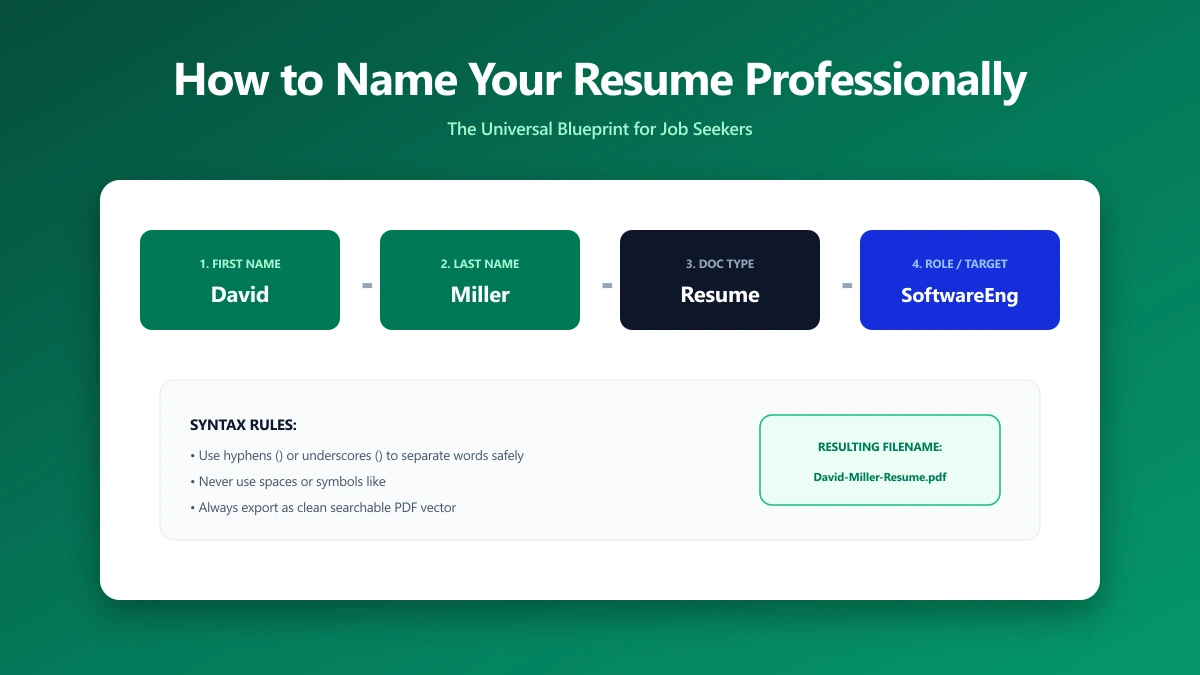
Most naming advice stops at "use your name". That is fine for one application and falls apart at forty, when you are tracking tailored versions across a dozen companies.
What you want is a convention: one pattern you apply without thinking, that stays readable to a stranger and sortable to you.
Here is the one to use, and how to extend it as your search grows.
Step 1: Start With the Pattern
Use FirstName-LastName-Resume-Role.pdf. Every part earns its place: your name identifies the file, the word Resume says what it is, the role says which opening it belongs to.
- 1.Your first and last name, spelled as on the application.
- 2.The word Resume, or CV if that is the convention where you are applying.
- 3.The role, matching the posting's wording.
- 4.The correct extension for the format you actually exported.
Step 2: Pick a Separator and Keep It
Hyphens and underscores both work. Spaces are the one to avoid, because some systems encode them as %20 in URLs and a few older portals mishandle them.
| Style | Example | Verdict |
|---|---|---|
| Hyphens | Jane-Doe-Resume-Analyst.pdf | Recommended, readable everywhere |
| Underscores | Jane_Doe_Resume_Analyst.pdf | Fine, equally safe |
| Spaces | Jane Doe Resume.pdf | Works usually, encodes awkwardly sometimes |
| Mixed | Jane_Doe-Resume Analyst.pdf | Avoid, looks unconsidered |
Step 3: Handle Multiple Versions Without Version Numbers
You will tailor your resume per role. The temptation is to append v2, v3, and that is exactly what you must not send.
Keep versioning in your folder structure instead of the filename. One folder per company, the same clean filename inside each.
- ●
/Applications/Acme/containsJane-Doe-Resume-Analyst.pdf - ●
/Applications/Globex/containsJane-Doe-Resume-Data-Analyst.pdf - ●The file you send is always clean, and you can still tell them apart.
Step 4: Match Your Other Documents
Cover letters, portfolios, and references should follow the same pattern so the set stays together once saved.
Keep the role wording identical across the set. A resume named Analyst and a cover letter named Data-Analyst look like two different applications.
Step 5: Check the Portal First
Some employers, particularly government and large enterprises, specify their own naming convention. Where they do, theirs wins outright.
Check the posting before exporting anything, then run through the rest of the pre-send check, which covers format, size, and metadata as well as the name.
The Bottom Line
One pattern: FirstName-LastName-Resume-Role.pdf. Hyphens, no versions, matching names across your documents, and the portal's rules ahead of yours.
If the finished file is over the upload limit, our PDF compressor will bring it down without touching the layout. The alternative formula and its edge cases are in what should I name my resume file.
Frequently asked questions
What is the best format for a resume file name?
Should I use hyphens or underscores in a resume filename?
How do I keep track of tailored resume versions?
Sources & references
This article was researched and written by Nikola, drawing on the following primary sources and documentation:
Ready to try it?
All tools run entirely in your browser, no uploads, no account required.
Compress PDFMore in Productivity
What Is the Best YouTube Thumbnail Size, Resolution, and Aspect Ratio? (2026 Specs)
How to Compress Huge Photoshop PSD Files for Client Email Preview (Export Guide)
How to Convert Scanned PNG Receipts to Searchable PDF With OCR (Tax & Expense Guide)