
What Resume File Names Do Hiring Managers Hate?
Summary
The filename patterns that annoy recruiters, ranked by how often they show up, and what each one accidentally tells the person reading your application.
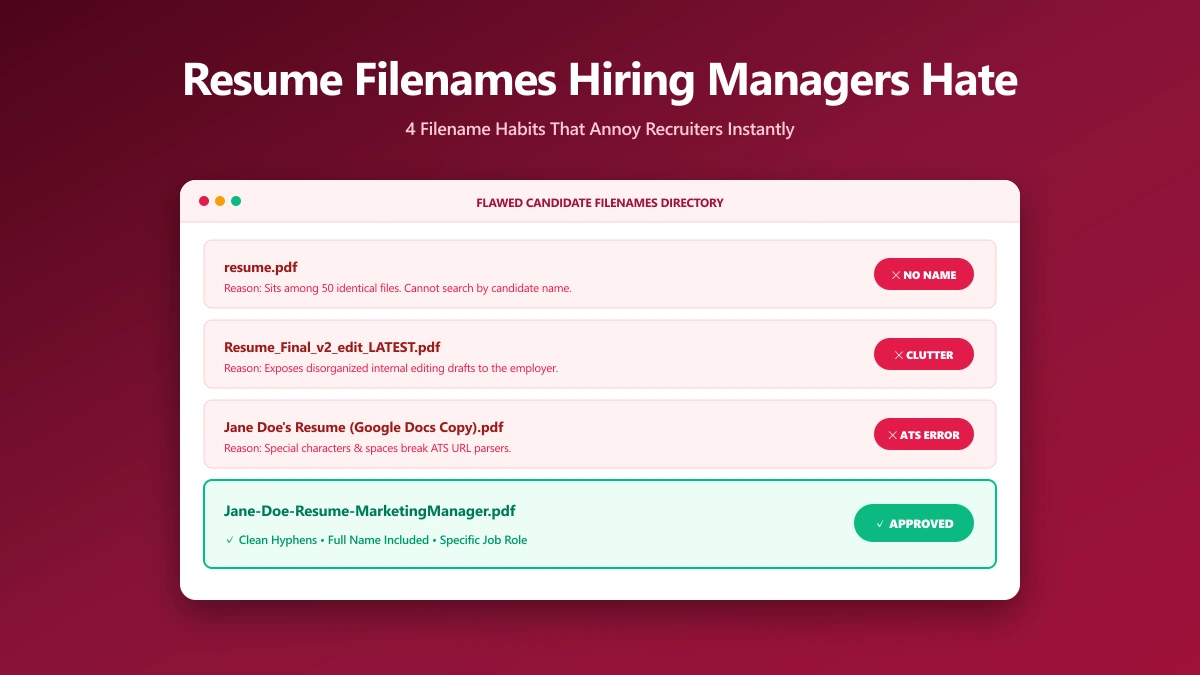
Recruiters do not hate filenames on aesthetic grounds. They hate the ones that make their afternoon harder.
Every pattern below causes a specific, practical problem: a file that cannot be found again, a name that leaks something you did not mean to share, or a document that will not open at all.
Ranked roughly by how often they turn up.
1. The Generic One
resume.pdf and cv.pdf are the most common filenames in any hiring inbox, which is exactly the problem. Save ten of them into one folder and the operating system starts appending numbers.
The recruiter now cannot tell your application from nine others without opening each one. Yours is not rejected, it is simply harder to return to.
2. The Visible Draft
resume-final.pdf, resume-final-FINAL.pdf, resume v3 (2).pdf. These are honest artefacts of writing, and they belong on your machine rather than in an application.
They read as a working file that was grabbed in a hurry. That is a small signal, but it is the first one you send.
3. The One Naming Another Company
Resume-for-Google.pdf sent to a different employer is the version of this that stings. It happens constantly, because tailoring resumes per application is good practice and renaming them is easy to forget.
The same leak can hide inside the file. PDFs often store an author name and sometimes a previous employer in their metadata, where you will not see it.
You can check and clear those fields with our PDF metadata editor: fix the author, or remove every property in one go. It works locally in the browser.
4. The Unreadable One
Long strings of underscores, dates in ambiguous formats, and internal reference numbers all make a filename harder to scan in a narrow column.
| Filename | Problem |
|---|---|
jd_res_2026_v2_updated_new.pdf | Unreadable at a glance |
12-05-2026-resume.pdf | Ambiguous date, no name |
Resume (1).pdf | Already a duplicate before it arrived |
Jane-Doe-Resume-Analyst.pdf | None |
5. The One That Will Not Open
This is the only entry that can actually cost you the application outright, rather than merely making a poor impression.
- ●A .docx renamed to .pdf, which fails to open rather than converting.
- ●A file too large for the portal, which is rejected at upload.
- ●A resume exported as a flat image, which parses as an empty document.
Size is the easiest to fix: run it through our PDF compressor before uploading. The reasons a resume PDF gets large in the first place are covered in how to compress a resume PDF for ATS.
The Fix Is One Line
Your name, the word Resume, and the role: Jane-Doe-Resume-Analyst.pdf. That defeats every pattern above at once.
The reasoning behind the formula is in why recruiters reject poorly named resume files.
Frequently asked questions
What is the worst thing to name a resume file?
Do recruiters actually notice the filename?
Should I include a date in my resume filename?
Sources & references
This article was researched and written by Nikola, drawing on the following primary sources and documentation:
Ready to try it?
All tools run entirely in your browser, no uploads, no account required.
Compress PDFMore in Productivity
What Is the Best YouTube Thumbnail Size, Resolution, and Aspect Ratio? (2026 Specs)
How to Compress Huge Photoshop PSD Files for Client Email Preview (Export Guide)
How to Convert Scanned PNG Receipts to Searchable PDF With OCR (Tax & Expense Guide)