Best Image Format for Discord Emojis and Stickers: Sizing & Transparency Guide
Summary
Which format to use for Discord emojis and stickers, the real limits (256 KB for emojis, 512 KB and 320 x 320 for stickers), and how to get clean transparent edges on dark themes.
For a static Discord emoji, use a transparent PNG at 128 x 128 pixels. It must be under 256 KB. For an animated emoji, use a GIF under the same 256 KB limit. For a sticker, use PNG if it is still and APNG (animated PNG) if it moves, at exactly 320 x 320 pixels and no more than 512 KB, with animations capped at 5 seconds.
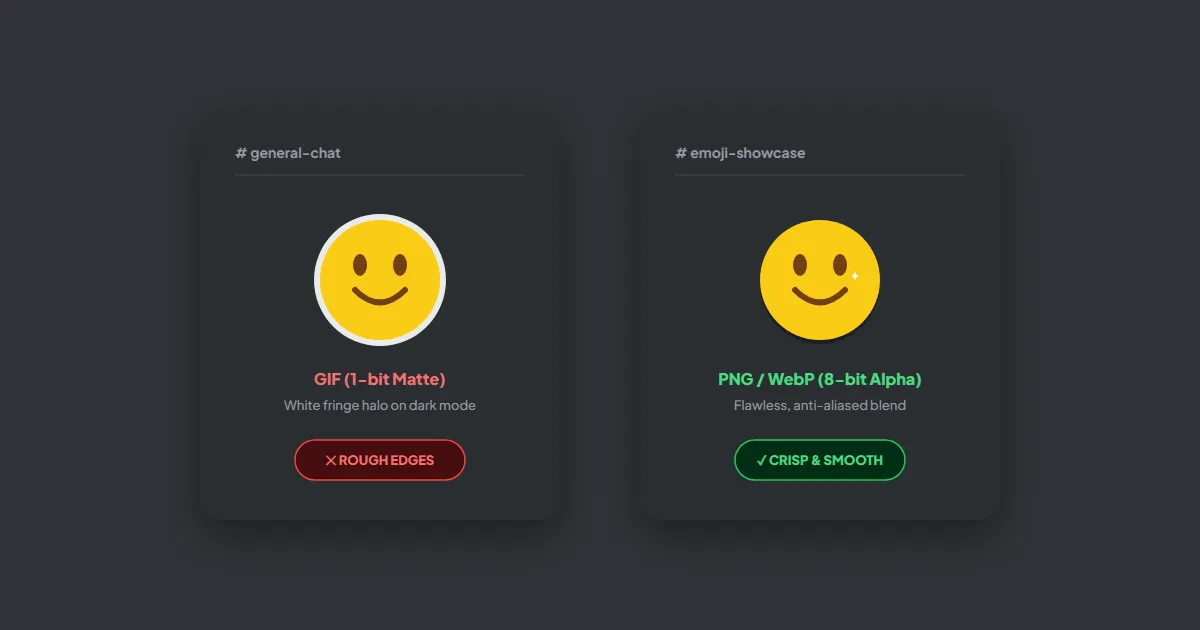
Format matters most at the edges. PNG and APNG store smooth, partly transparent edge pixels. GIF cannot, which is why GIF emojis so often show a white fringe on Discord's dark theme. The rest of this guide covers the limits, the halo problem, and how to get an oversized file under the cap.
Discord's limits at a glance
| Item | Best format | Size in pixels | Maximum file size |
|---|---|---|---|
| Static emoji | PNG with transparency | 128 x 128 | 256 KB |
| Animated emoji | GIF | 128 x 128 | 256 KB |
| Static sticker | PNG | 320 x 320 | 512 KB |
| Animated sticker | APNG (GIF also accepted) | 320 x 320, up to 5 seconds | 512 KB |
Discord's documentation also accepts JPEG, WebP and AVIF for emojis, and serves every emoji as WebP regardless of what you uploaded. JPEG has no transparency, so it leaves a solid box around the art. Lottie stickers, the vector animations Discord uses for its own packs, can only be uploaded by verified or partnered servers.
Why GIF emojis get a white halo on dark mode
Smooth artwork has edge pixels that are partly see-through, so the shape blends into whatever is behind it. PNG keeps a separate alpha value for every pixel, from fully clear to fully solid, and APNG and WebP work the same way. GIF has only one option per pixel: shown or hidden. When you save soft-edged art as a GIF, each edge pixel is either dropped or made solid, and the solid ones keep the color they were blended with in your editor. Draw on a white canvas, and those pixels are a pale gray-white that glows against Discord's dark background.
For static emojis the fix is simply to use PNG. Animated emojis are usually GIFs, so you have to work with the limitation:
- 1.Set the matte color in your GIF export to a dark gray close to Discord's dark theme. Photoshop's Save for Web dialog and most GIF tools have a Matte setting. Edge pixels are then blended toward dark instead of white.
- 2.Or give the artwork a 1 to 2 pixel dark outline, so the outermost pixels are fully solid and there is nothing semi-transparent to fringe.
- 3.Check the result on both light and dark themes. A GIF matted for dark mode shows a slight dark edge in light mode, and an outline is the only approach that looks right on both.
Design for about 22 pixels, not 128
You upload at 128 x 128, but an emoji appears in a line of chat at roughly 22 pixels, and reactions are smaller still. Only a message that contains nothing but emojis shows them larger, at around 48 pixels. Fine detail and thin strokes vanish at that size.
- ●Crop tightly. Transparent padding around the art is shrunk along with it, so the visible emoji ends up smaller than its neighbors.
- ●Use thick shapes and strong contrast. A face should read from its silhouette alone.
- ●Skip text inside emojis unless it is one or two big letters.
- ●Before uploading, zoom your editor out until the art is about the size of a chat line and judge it there.
Getting an emoji under 256 KB
A 128 x 128 PNG is rarely anywhere near 256 KB. If yours is too big, it was almost certainly exported at a larger size, such as straight from a 1024 pixel canvas. Shrink the dimensions first. Resize Image can set it to 128 x 128 in your browser. If it still needs to be smaller, Compress PNG reduces it to a palette of up to 256 colors while keeping the alpha channel, which suits flat emoji art well. Neither tool uploads your file.
Animated GIFs are harder because every frame counts. Cut frames first, then colors, then dimensions. The free command-line tool gifsicle does all three in one step:
gifsicle -O3 --resize 128x128 --colors 128 --lossy=60 party.gif -o party-small.gifLower --colors or raise --lossy step by step until the file fits. Dropping every second frame of a 30 fps animation also roughly halves its size, and a 15 fps loop still looks smooth at emoji size.
Making an animated sticker as APNG
Many animation tools export GIF or video but not APNG. ffmpeg converts either one, scaling to the exact sticker size and setting the loop to repeat forever:
ffmpeg -i wave.gif -vf "scale=320:320:flags=lanczos" -plays 0 -f apng wave-sticker.pngKeep the animation to 5 seconds or less. If the file is over 512 KB, reduce the frame rate with -r 15 before the output name, or simplify the art. Converting a GIF to APNG does not restore the soft edges the GIF already lost, so export from your original project with transparency where you can.
Uploading
- ●Emojis: Server Settings > Emoji > Upload Emoji. Names can use letters, numbers and underscores.
- ●Stickers: Server Settings > Stickers > Upload Sticker, where you also choose a related emoji and a name.
- ●You need the permission to create expressions on that server.
- ●An APNG posted as a normal file attachment in chat may show as a still image. It animates when it is uploaded as a sticker.
Frequently asked questions
How many custom emojis can a Discord server have?
Can people without Nitro use my server's custom emojis?
Should I upload my emoji as WebP to save space?
Why does Discord reject my sticker even though it is under 512 KB?
Sources & references
This article was researched and written by Nikola, drawing on the following primary sources and documentation:
Ready to try it?
All tools run entirely in your browser, no uploads, no account required.
Compress PNG