
How to Make Your Resume Stand Out Before Anyone Opens It
Summary
Your filename is the first thing a recruiter reads. Small presentation choices that make your application look considered before the document opens.
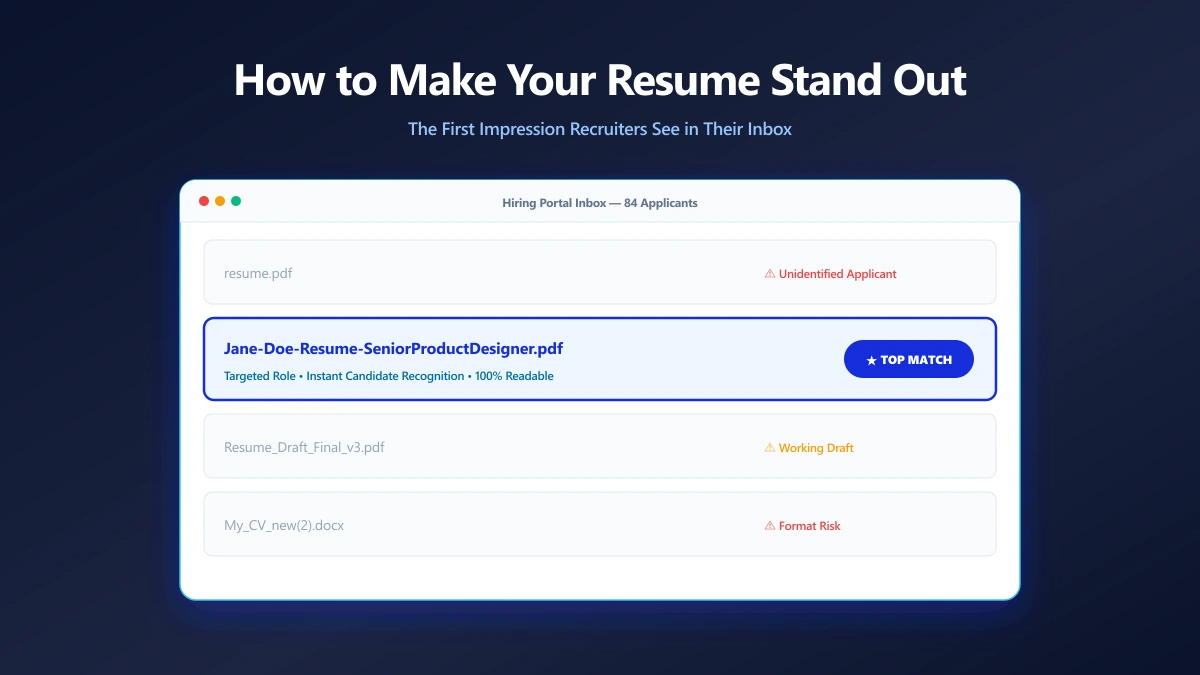
Everyone optimises the words. Almost nobody optimises the twenty characters a recruiter actually sees first.
Before your resume is a document, it is a row in a list: a filename, a size, a timestamp. That row is doing work on your behalf whether you thought about it or not.
None of what follows will win you a job. All of it costs about a minute, and it removes the small frictions that make an application look like an afterthought.
Presentation Starts Outside the Document
A hiring inbox is a list view. Your filename sits alongside dozens of others, and it is the only thing distinguishing you until someone clicks.
That makes the filename a genuine presentation surface, not admin. It answers two questions instantly: whose is this, and what is it for.
| What they see in the list | What it signals |
|---|---|
resume.pdf | Sent in bulk, nothing tailored |
resume-final-v3.pdf | They are seeing a working draft |
Jane-Doe-Resume-Product-Designer.pdf | Considered, and easy to find again |
The Details That Separate Considered From Careless
These are small individually. Together they are the difference between an application that feels assembled and one that feels forwarded.
- ●Name the file for the reader, not for your folder. Your name belongs in it, theirs does not.
- ●Match the role to the posting. A filename naming the exact job title reads as deliberate.
- ●Keep the extension honest. A .pdf that is really a renamed .docx will fail to open.
- ●Keep it short enough to read at a glance in a narrow column.
- ●Stay consistent across attachments, so the resume and cover letter obviously belong together.
The full pattern, including how to handle spaces and versions, is in what should I name my resume file.
The Package, Not Just the File
If you are attaching more than one document, treat them as a set. Matching names make the pairing obvious even after the files are saved and separated on someone else's machine.
- 1.
Jane-Doe-Resume-Product-Designer.pdf - 2.
Jane-Doe-Cover-Letter-Product-Designer.pdf - 3.
Jane-Doe-Portfolio-2026.pdf
If the portal only allows one upload, combine them into a single PDF in the order the employer asked for, rather than dropping the cover letter entirely.
Make Sure It Actually Opens
Presentation collapses if the file is broken. Two failures are common and both are invisible to the sender.
The first is size: portals cap uploads, often at 2 MB, and an embedded photo will clear that alone. Our PDF compressor runs in the browser, so a document carrying your address never leaves your device. The second is a resume exported as a flat image, which looks fine to you and reads as blank to a parser.
If your file is oversized, compressing a resume PDF without breaking the formatting covers doing it safely.
The Bottom Line
You cannot control who reads your resume or how long they spend on it. You can control whether it arrives looking like it was meant for them.
Name it properly, keep the set consistent, check it opens. Then run the rest of the pre-send check before you upload.
Frequently asked questions
Does the resume filename really matter to recruiters?
Should I put the job title in my resume filename?
Should my cover letter filename match my resume?
Sources & references
This article was researched and written by Nikola, drawing on the following primary sources and documentation:
Ready to try it?
All tools run entirely in your browser, no uploads, no account required.
Compress PDFMore in Productivity
What Is the Best YouTube Thumbnail Size, Resolution, and Aspect Ratio? (2026 Specs)
How to Compress Huge Photoshop PSD Files for Client Email Preview (Export Guide)
How to Convert Scanned PNG Receipts to Searchable PDF With OCR (Tax & Expense Guide)